

Projection Distortion and Terrain Analysis
Slope is a rise divided by a run. The rise comes from the elevations in the DEM; the run is the distance between the center points of two cells on the ground. Every tool that derives something from a DEM — slope, aspect, a hillshade, surface area, ruggedness, the wetness index — needs that distance, and the obvious place to get it is the raster's cell size. On a projected DEM the cell size is a number in the projection's linear unit, meters or feet, and it is tempting to treat it as the distance on the ground. It is not, or not quite. Every map projection stretches or shrinks distances by some amount that changes from place to place, and a cell that is 30 m wide on the map can actually be only 25 m or 8 m wide on the ground. This page explains how large the effect is, which projections suffer from it, and how every tool in this add-in now measures its distances on the spheroid, in any coordinate system, so that the effect drops out.
What the cell size gets wrong
A map projection's scale factor at a point is the ratio of a distance on the map to the same distance on the ground. Where it is 1 the map is true to scale; elsewhere map distances are too long (scale factor above 1) or too short (below 1). The projections designed for regional work keep it close to 1: a UTM zone runs from 0.9996 on its central meridian to no more than 1.001 at its edges, State Plane zones are built to a tighter tolerance still, and a continental Albers or Lambert conic stays within about a percent of 1 over the region it was designed for (Snyder 1987). A planar method that uses the nominal cell size on those systems is wrong by a few hundredths of a percent to a percent, which no one would notice in a slope map.
Web Mercator is one important exception that matters, because so much data now arrives in it. Mercator's scale factor is 1 at the equator and grows as 1 / cos(latitude): 1.22 at Flagstaff, 1.41 at 45° and 2 at 60°. A “30 m” Web Mercator cell at Flagstaff's latitude is only 24.5 m across on the ground east–west and 24.4 m north–south. Divide a rise by 30 when the true run is 24.5 and every gradient comes out 18 percent too small, and the error grows toward the poles:
| Latitude | Ground width of a “1000 m” Web Mercator cell | A true 30° slope reads as |
|---|---|---|
| 0° | 1000 m | 30.0° |
| 35.2° (Flagstaff) | 818 m | 25.3° |
| 45° | 708 m | 22.2° |
| 60° | 501 m | 16.1° |
| 75° | 259 m | 8.5° |
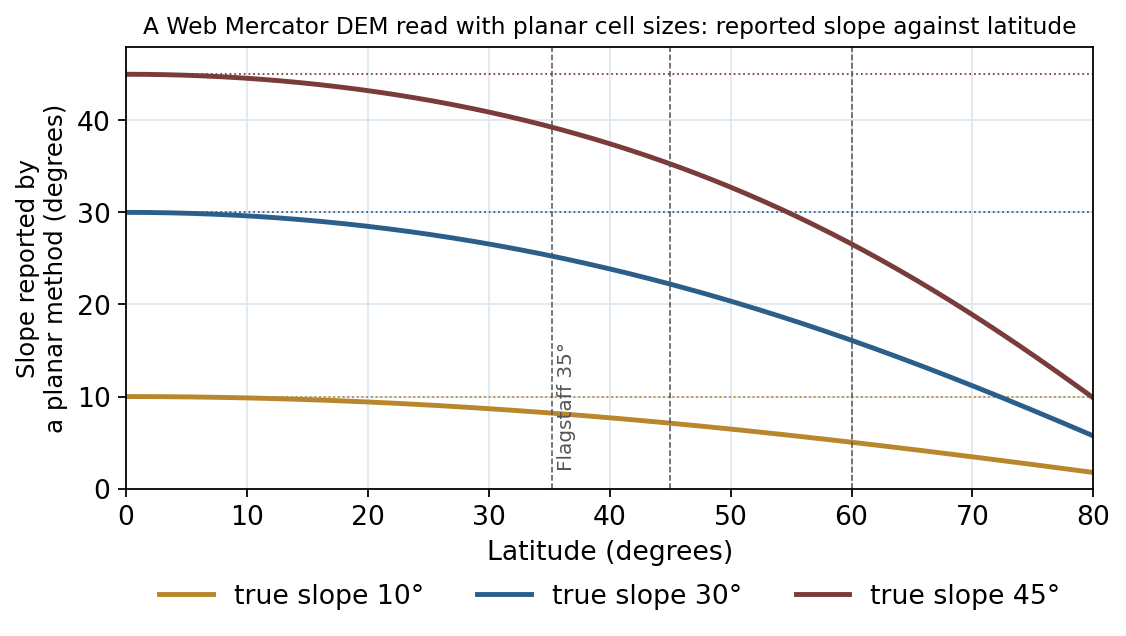
Aspect is barely affected by Web Mercator, because the distortion is very nearly the same in every direction there (the two directions differ by less than a percent, which can move an aspect by a fifth of a degree at most), but anything that depends on the magnitude of the gradient is affected: slope, the hillshade's brightness, surface area and its ratio, the vector ruggedness measure, the terrain ruggedness index, the wetness index, and the size in cells of any neighborhood given in meters. A 500 m radius converted with the nominal cell size at 60° north spans half the cells it should.
Geographic (latitude/longitude) DEMs have a different version of the same problem, well known and handled for years by the tools here: a degree of longitude is a different distance at every latitude, so the ground size of a cell changes from row to row of the raster. The hillshade, roughness and TPI tools have always computed each row's true cell dimensions on the spheroid for a geographic DEM, and that per-row treatment is exact there, because on a spheroid of revolution every column is the same.
Where the scale factor changes
How a projection's scale factor varies across a raster depends on the projection's family, and the pattern decides what a correction has to do.
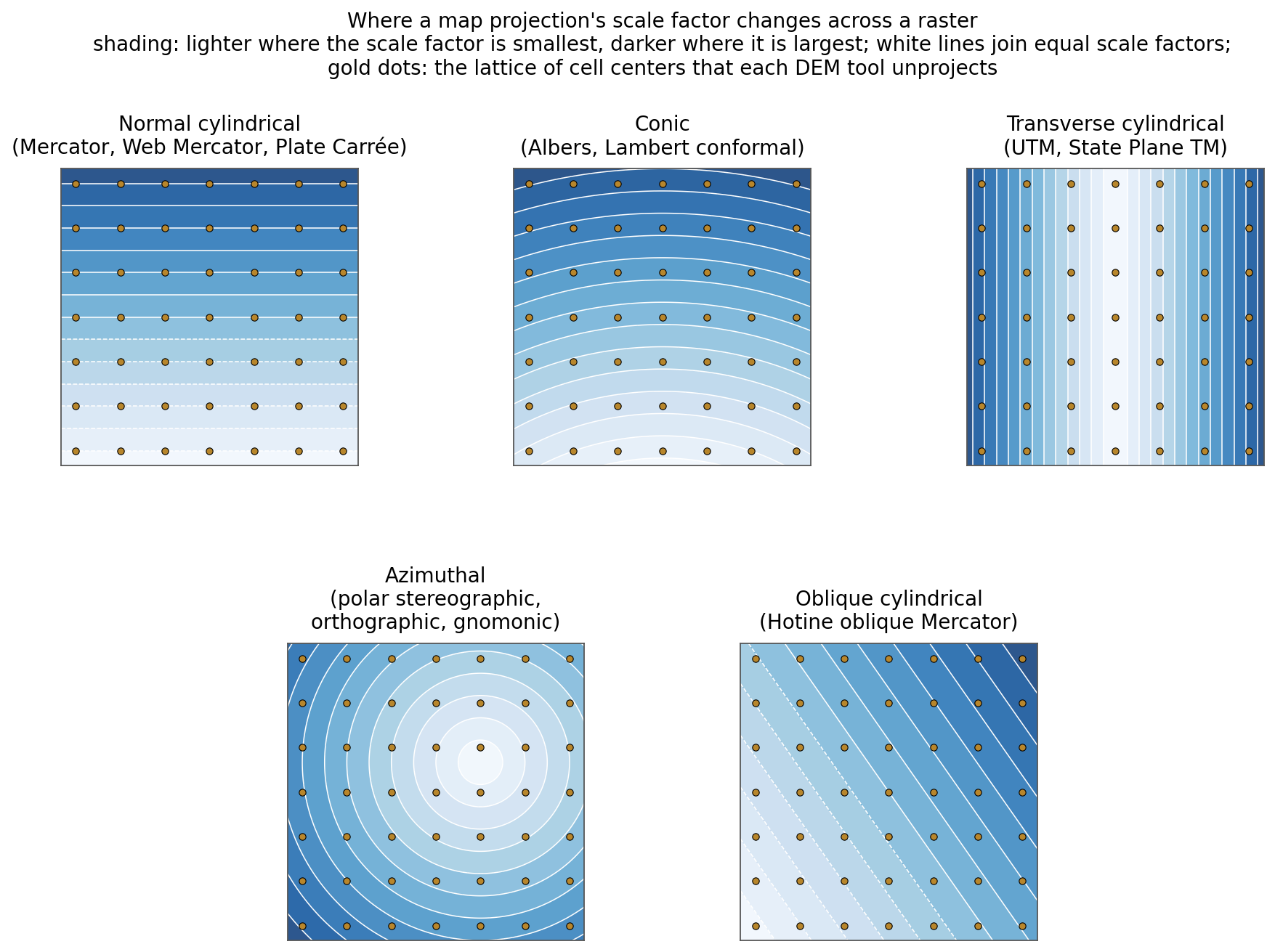
- Normal cylindrical (Mercator, Web Mercator, Plate Carrée, the equal-area cylindricals): the scale factor depends on latitude alone, so it is constant along every row of a north-up raster and changes only from row to row.
- Conic (Albers, Lambert conformal, the equidistant conic): the scale factor depends on latitude, but a raster row is not a line of constant latitude, since parallels are arcs on a conic map. So the scale factor changes along a row as well as down the columns: by about a tenth of a percent across a state-sized DEM, and by more than a percent on a continental one. On the row of a lower-48 Albers grid that crosses the 49th parallel at the central meridian, a 1000 m cell is 986 m on the ground at the meridian and 998 m at the row's ends 2,200 km away, where the row has drifted south to 46°N.
- Transverse cylindrical (UTM, the transverse Mercator State Plane zones, Gauss-Krüger): the scale factor depends on the distance from the central meridian, so it changes along the rows rather than down the columns, but only by a few hundredths of a percent within a zone.
- Azimuthal (polar stereographic, Lambert azimuthal equal area, orthographic, gnomonic, azimuthal equidistant): the scale factor depends on the distance from the projection's center, in rings, so it changes along rows and columns alike. A continental polar stereographic DEM of Antarctica or Greenland spans several percent.
- Oblique cylindrical (the Hotine oblique Mercator of Alaska State Plane zone 1 and the Swiss grid): the scale factor depends on the distance from an oblique center line, so it changes along a diagonal.
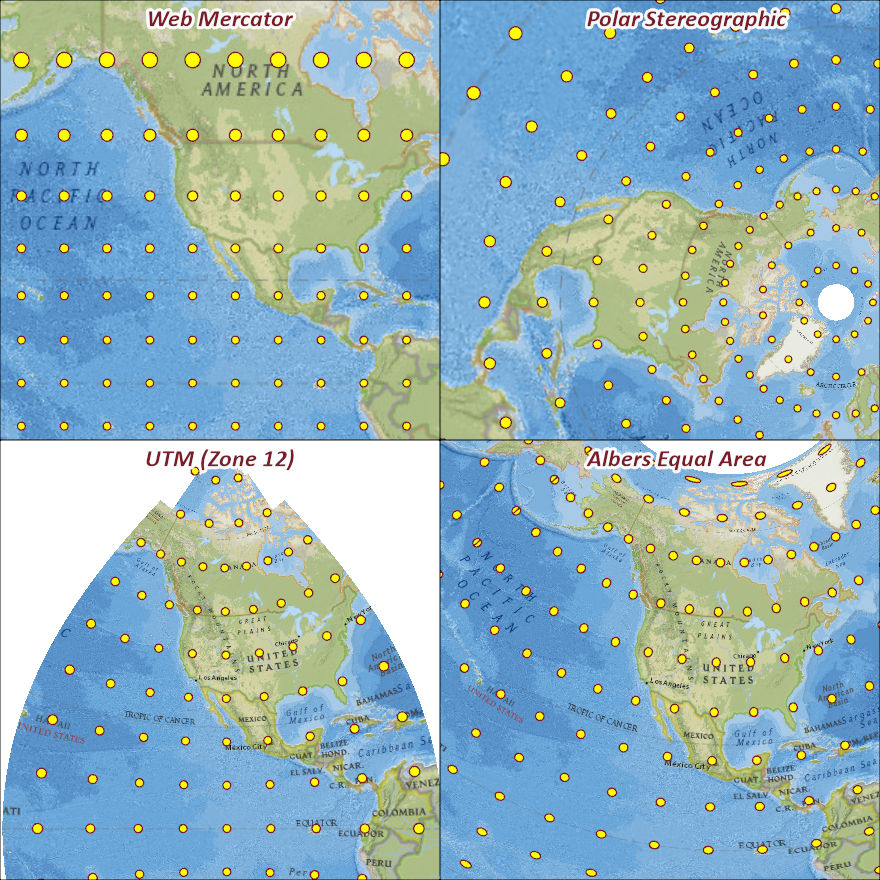
The chart is a sketch. The surest way to see a projection's distortion is to draw something whose true size is known. The figure below takes a grid of circles, each 100 km in radius on the ground, and draws it in four projections, so that every circle takes the size and shape its projection gives that place.
How the tools measure distances
Rather than correct the cell size by a formula for each projection, the tools go back to the Earth. Each tool takes a lattice of cell centers across the raster — one node every 16 cells or so in each direction, never more than 257 per axis, always including the last row and column — and unprojects each node to latitude and longitude with the coordinate-system library that ArcGIS Pro itself ships (GDAL's osr; see below). The node and its neighboring cell centers are then converted to earth-centered three-dimensional coordinates on the DEM's own spheroid, and the five distances the gradient needs — east-west across the row above, the row itself and the row below, and north-south up and down — are measured there as straight chords, exactly as they always were for a geographic DEM. Every other cell's five distances are then interpolated bilinearly between the four nearest nodes. The spacing stays at 16 cells until the raster's longer side passes 4,096 cells; beyond that it is the longer side divided by 256, rounded up, so a DEM 10,000 cells across gets a node every 40 cells. The lattice therefore never holds more than 257 × 257 nodes, 66,049 cell centers, however large the DEM.
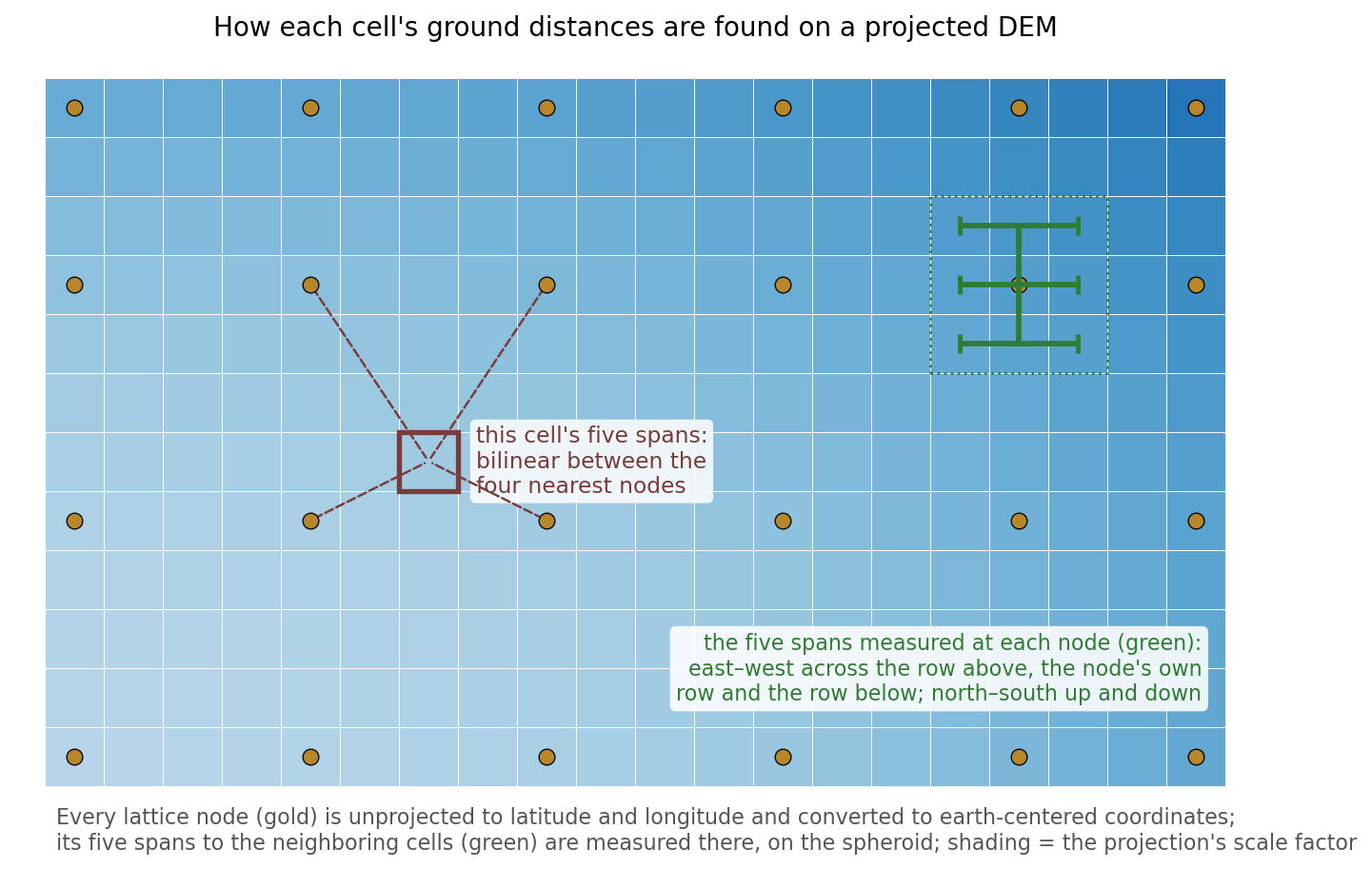
This handles every family in the figure above, because it makes no assumption about how the scale factor varies: azimuthal and oblique projections, whose scale changes along the rows, come out as right as Web Mercator. Scale factors vary smoothly, so the interpolation between nodes is accurate to better than a thousandth of a percent even on polar stereographic data, and the whole lattice for a raster of thousands of cells on a side takes well under a second to build. A geographic DEM needs no lattice and keeps its exact per-row table. If a DEM's coordinate system cannot be unprojected at all — an unusual custom projection, or no projection information — the tool falls back to the nominal cell size and says so in a warning.
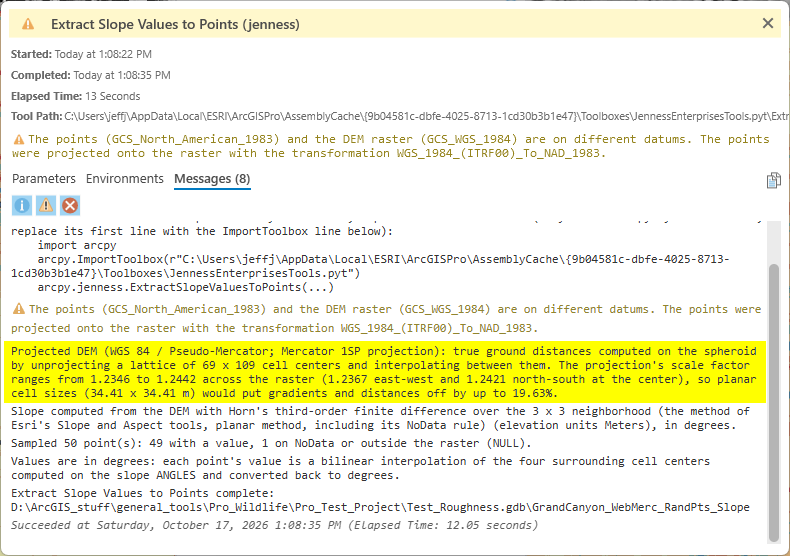
The run messages of every tool report what happened, with the projection's name, the size of the lattice and the range of the scale factor across the raster, for example: “Projected DEM (WGS 84 / Pseudo-Mercator; Mercator 1SP projection): true ground distances computed on the spheroid by unprojecting a lattice of 19 x 19 cell centers and interpolating between them. The projection's scale factor ranges from 1.2219 to 1.2284 across the raster, so planar cell sizes (30.00 x 30.00 m) would put gradients and distances off by up to 18.59%.” The metadata of each output raster carries the same information.
One group of quantities still uses a single column: the number of cells a neighborhood radius given in meters converts to, for the roughness, TPI, blur and focal tools. A radius is a whole number of cells per row in any case, and a difference of a percent or two in it, on the azimuthal projections where the single column is an approximation, does not change the result in any way you could see.
Why not one representative column
The shortcut that first suggests itself is to unproject a single column of cell centers, say the middle one, and use its per-row distances for every row — the same per-row table a geographic DEM uses. That is exact for the normal cylindrical family, where the scale factor really is the same along every row, and close enough for conic and transverse systems, whose distortion is small by design. It fails for the azimuthal and oblique families, and not gracefully. On a polar stereographic DEM of Antarctica, a row that passes through the pole has its smallest scale factor at the middle and its largest at the coasts; using the middle value everywhere would correct the coastal cells in the wrong direction, by more than the planar error it set out to remove. The lattice costs little more and has no such failure case, which is why the single column method was rejected.
Aspect and grid north
The distance correction fixes the magnitude of the gradient. Its direction is a separate matter. Aspect is measured on the raster's grid, clockwise from the top of the raster, which is grid north; and on a projected DEM grid north differs from true north by the grid convergence, an angle that depends on the projection and on where the cell sits. It is under a degree across most of a UTM zone, up to about ten degrees at the east and west edges of a continental Albers or Lambert projection of the United States, and on a polar stereographic map it is simply the difference in longitude from the central meridian. Esri's Aspect tool reports aspect from grid north in the same way, and so do the aspect values this add-in's tools derive from a DEM, so that the two agree cell for cell. The values are right for anything that compares cells with one another on the same grid. Where a true-north direction is needed, add the convergence angle at each point; Esri's Surface Parameters tool, which works in geocentric coordinates, reports true-north aspects directly.
How this compares with Esri's tools
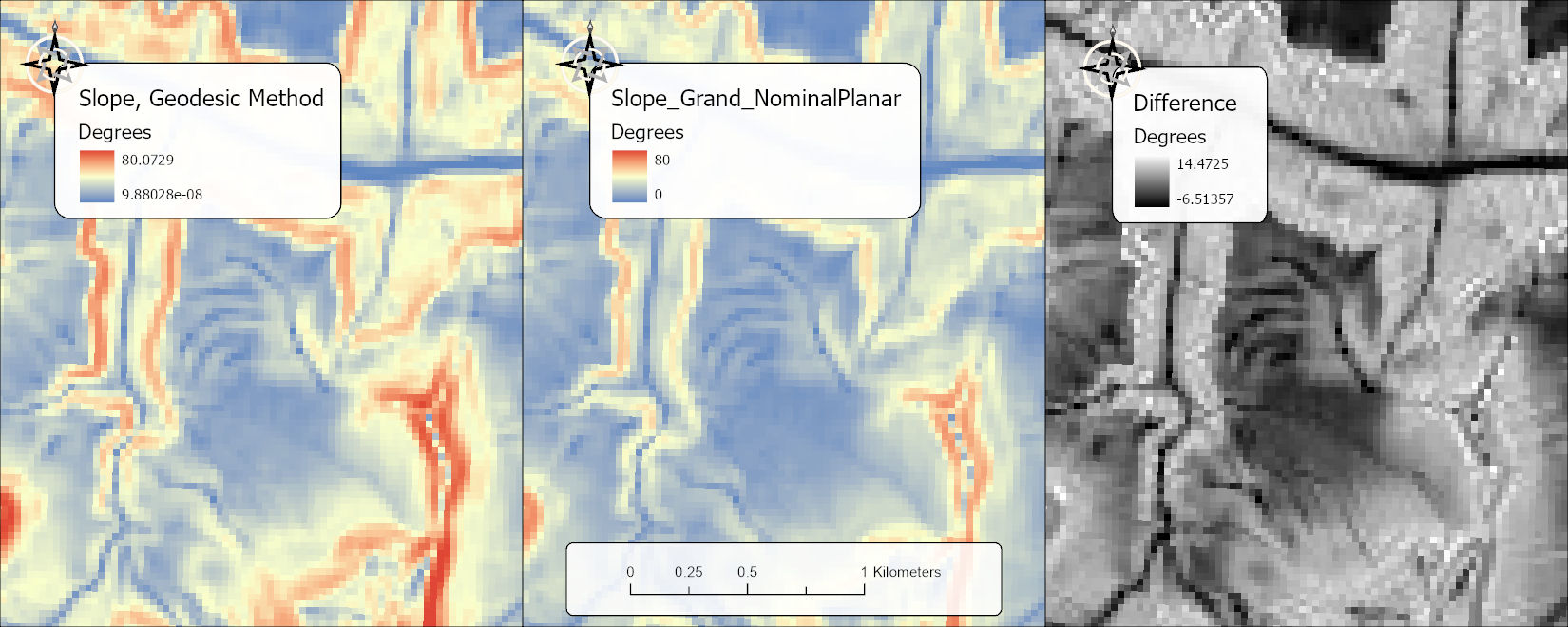
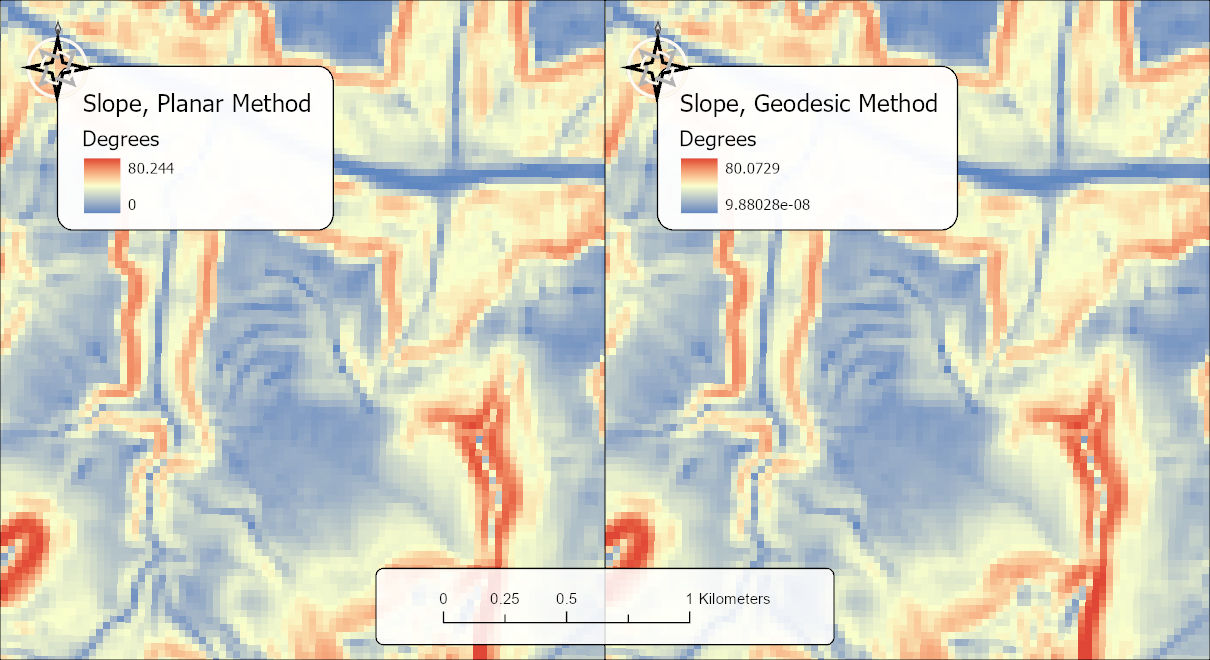
Esri's Slope and Aspect tools offer a planar and a geodesic method, and its Surface Parameters tool is geodesic throughout: the geodesic methods convert the cells to earth-centered coordinates and compute on the ellipsoid, so a projection's distortion never enters (Esri, How Slope works; How Surface Parameters works). In tests for this page, Esri's planar Slope in ArcGIS Pro 3.7 also came out within a fifth of a degree of the true slope on Web Mercator and on polar stereographic DEMs, so Pro's planar method evidently allows for projected scale as well; on a lat/long DEM, where Esri's own documentation says to use the geodesic method, its planar method was off by two degrees at Flagstaff's latitude and ten degrees at 75° north. The tools here do not try to reproduce Esri's geocentric arithmetic. They keep the familiar Horn 3 × 3 gradient and the eight-triangle surface area and feed them true ground distances, which gives the same numbers as Esri's planar tools wherever a projection is true to scale and correct numbers where it is not.
On a real DEM the two Esri methods are hard to tell apart. The figure below runs both on the Web Mercator DEM of the Grand Canyon used above, and its caption gives the numbers behind the comparison.
How it was tested
The method was checked against an analytic surface rather than a real DEM, because only an analytic surface has a slope that is known exactly at every point. A plane tilted ten degrees with two Gaussian hills on it was defined as a function of latitude and longitude, written as a DEM in four coordinate systems around Flagstaff (UTM zone 12N, latitude/longitude, Web Mercator and a WGS84 Albers) and in four at 75° north (UTM zone 24N, the NSIDC polar stereographic, Web Mercator and latitude/longitude), and every DEM tool was run on all eight. Slopes from the Horn gradient agreed with the analytic slope to within a hundredth of a degree on every system except Albers, where the raster's own one-percent scale distortion sets the limit at 0.04°; the surface ratio agreed with 1 / cos(slope) to within 0.002 percent; and at the same physical points the slopes from the eight DEMs agreed with one another to within 0.04°. On the UTM DEMs the slope values matched those extracted from Esri's planar Slope raster to 0.006°, which is exactly UTM's 0.9996 scale factor, and the aspects matched to a millionth of a degree.
What to do
- Nothing special. Give the tools the DEM in whatever coordinate system it comes in; the distances are measured on the spheroid either way. Reprojecting a DEM resamples it and costs accuracy of its own (see Projecting Rasters), so there is no reason to reproject for the sake of these tools.
- Read the run messages once for a new DEM. The projected-DEM line tells you the scale factor range; a warning means the coordinate system could not be unprojected and the nominal cell size was used.
- For other software, prefer a projection that is true to scale over your area — UTM, State Plane, or a conic with well-placed standard parallels — and avoid deriving terrain variables from Web Mercator with any tool that does not say how it handles the scale factor.
- Aspect from a projected DEM is relative to grid north. Add the grid convergence if a true-north bearing is what the analysis needs.
Credits and references
Written for version 1.113.62.1 of the add-in, which introduced the lattice method; the diagrams on this page were drawn for it, and the figures from real data are described in the captions above. The scale-factor behavior of the projection families follows Snyder (1987). The per-row treatment of geographic grids was first built into the author's DEM Surface Tools extension for ArcMap in 2009 (Jenness 2013), and has its published counterpart in Florinsky's (1998) derivatives for spheroidal trapezoidal DEMs.
The basemap under the maps in the figures on this page is Esri's National Geographic World Map basemap (sources: National Geographic, Esri, Garmin, HERE, UNEP-WCMC, USGS, NASA, ESA, METI, NRCAN, GEBCO, NOAA, increment P Corp.).
- Esri. 2026. National Geographic World Map [basemap]. ArcGIS Online, Esri, Redlands, California. arcgis.com/home/item.html?id=b9b1b422198944fbbd5250b3241691b6. Accessed on 18 October 2026.
- Esri. How Slope works and How Aspect works. ArcGIS Pro tool reference. <https://pro.arcgis.com/en/pro-app/latest/tool-reference/spatial-analyst/how-slope-works.htm> and <https://pro.arcgis.com/en/pro-app/latest/tool-reference/spatial-analyst/how-aspect-works.htm>. Accessed 28 Sep 2026.
- Esri. How Surface Parameters works. ArcGIS Pro tool reference. <https://doc.esri.com/en/arcgis-pro/latest/tool-reference/spatial-analyst/how-surface-parameters-works.html>. Accessed 16 Oct 2026.
- Florinsky, I. V. 1998. Derivation of topographic variables from a digital elevation model given by a spheroidal trapezoidal grid. International Journal of Geographical Information Science 12:829–852. https://doi.org/10.1080/136588198241527
- Jenness, J. 2013. DEM Surface Tools for ArcGIS (v. 2.1.375). Jenness Enterprises. jennessent.com/arcgis/surface_area.htm
- Snyder, J. P. 1987. Map projections: a working manual. U.S. Geological Survey Professional Paper 1395. https://doi.org/10.3133/pp1395
Related pages
- Projecting Rasters — why reprojecting a DEM resamples it, and what that does to its derivatives
- Extract Slope Values to Points and Extract Aspect Values to Points — compute slope or aspect straight from a DEM at the points, by Horn's method or a quadratic fit
- About Hillshades and the Swiss Method, Enhanced Hillshade, MDOW Hillshade, Multi-Sun Hillshade and Blurred Hillshade — the hillshade tools
- Vector Ruggedness Measure, Surface Area and Ratio, Arc-Chord Ratio and Terrain Ruggedness Index — roughness measures built from cell-to-cell distances
- Topographic Position Index, Slope Position Classification, Landform Classification and TPI Neighborhood Sampler — neighborhood radii in ground units, and slope computed on the fly
- Topographic Wetness Index — slope and cell area from true ground distances
- LSRI on DEM and LSRI on Contours — contour lengths measured on the spheroid
- Topography along Lines and Split Lines into Topography Segments — slope and aspect under polylines
- Aspect Focal Statistics, Diversity Indices, Land Facet Density and Create Habitat Patches — neighborhoods and areas in ground units