

Extract Slope Values to Points
Summary
Adds a field holding the slope at each point, read from a slope raster, to a copy of a point feature class or to the feature class itself. This tool is nearly identical to Esri's Extract Values to Points, except that it correctly interpolates percent slope values, it can add the field to the existing point features if you want, and it needs no license for any extension. The raster can also be a DEM: the tool then computes the slope itself at each point, by Horn's 3 × 3 method (the method of Esri's Slope tool) or a least-squares quadratic over a window you choose, with the distances between cells measured on the spheroid in any coordinate system (see Computing from a DEM).
What is different about slope
Esri's Extract Values to Points, with interpolation switched on, averages the four cell values around a point as plain numbers. That is the right thing for elevation, temperature or any raster whose values can be added together. A percent-slope raster is different. Percent slope is 100 times the rise over the run, and rise over run is the tangent of the slope angle, so the raster holds tangents. The tangent grows faster and faster as the angle steepens: 45° is 100%, 70° is 275%, and 85° is 1,143%. Average two tangents and the steeper one pulls the result up more than the gentler one pulls it down, so an interpolated value made from raw percents comes out too steep. A point midway between a 50° cell and a 70° cell lies on ground whose slope is 60°, which is 173.2%. The mean of the two percent values is 197.0%, which is a 63.1° slope, three degrees too steep.
| Slope angle | Percent slope | |
|---|---|---|
| One cell | 50° | 119.2% |
| The other cell | 70° | 274.7% |
| Mean of the angles | 60° | 173.2% |
| Mean of the percents | 63.1° | 197.0% |
The error is small on gentle ground and grows with steepness and with the contrast between neighboring cells; the Slope Zonal Statistics as Table page tabulates it for pairs of slopes from 10° to 89°. A raster in degrees has no such problem, because the angle is the quantity being averaged.
This tool therefore interpolates on the angles. With interpolation on, each of the four cell centers around the point is converted to its slope angle: the arctangent of the percent divided by 100, or of the rise:run ratio; a rescaling for gradians; nothing at all for degrees. The angles are combined with the standard bilinear weights, and the result is converted back to the raster's unit. For a percent-slope raster:
where pi is the percent slope of each of the four surrounding cell centers and wi its bilinear weight, which depends on how close the point lies to that cell center; the four weights sum to one. A degree raster and a percent raster of the same ground give the same answer, one as an angle and the other as its tangent times 100.
Two ways to extract
The Interpolate checkbox chooses between two readings of the raster, and the default matches Esri's default:
- Unchecked: each point receives the value of the cell it falls in, exactly as stored, in the raster's own unit. Nothing is converted, so the values are the ones Esri's Extract Values to Points writes with its default setting. This is the right choice when the raster's cells are small compared with the precision of the point locations, or when the stored values themselves are what you need.
- Checked: each point receives the bilinear interpolation of the four surrounding cell centers, computed on the slope angles as above and written in the raster's unit. This smooths out the cell edges and gives a point near the boundary of two cells a value between them rather than the value of whichever cell happens to contain it. A NoData neighbor is left out and the weights of the remaining neighbors are renormalized to sum to one, as is a neighbor whose value is outside the valid range for the unit (see below); a point with no usable neighbor gets no value.
Units and how they are detected
The Slope units of the input raster drop-down names the unit the raster's values are in, the same four choices as the Slope Zonal Statistics as Table tool:
- Degrees (-90 to 90): the slope angle itself.
- Percent slope (rise/run × 100): also called grade; 45° is 100%, and there is no upper limit.
- Rise:run ratio: the tangent itself, percent divided by 100; again no upper limit.
- Gradians (gons): a right angle divided into 100 parts, so 100 gon is 90°.
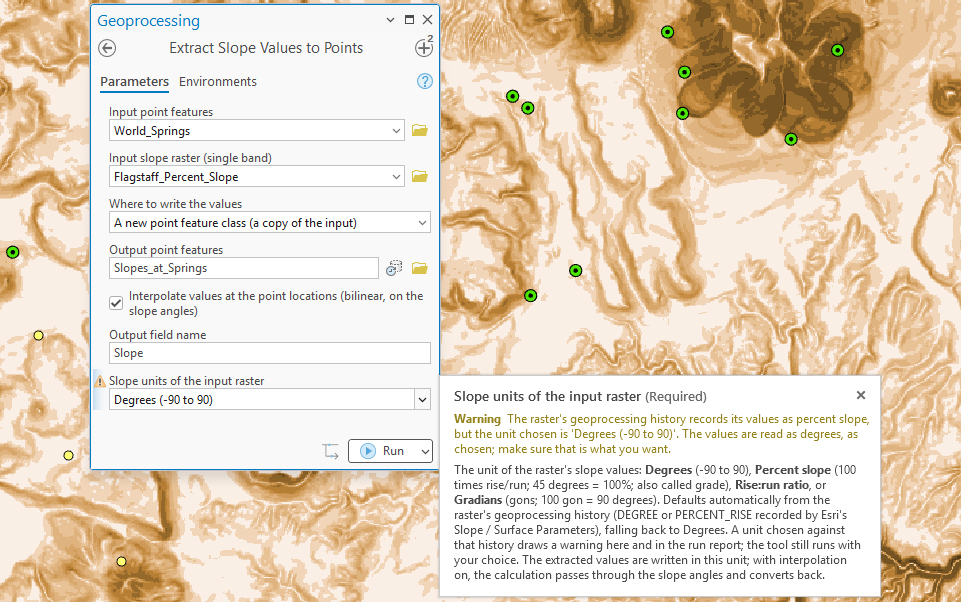
The tool fills this in for you when it can. Esri's Slope and Surface Parameters tools record their output unit (DEGREE or PERCENT_RISE) in the geoprocessing history stored in the raster's metadata, and the tool reads that history when you pick a raster and sets the drop-down to match. When the history says nothing, the drop-down falls back to Degrees.
If the history records one unit and you choose another, the drop-down shows a warning, the tool runs with the unit you chose, and the same warning is written to the run report and into the new field's metadata. The history can only ever say degrees or percent, because those are the two units Esri's tools write, so choosing rise:run or gradians for a raster that has a history draws the warning too. It is still the right choice for a raster that really is in one of those units; the warning is there to make you look.
Values beyond ±90 for degrees, or ±100 for gradians, cannot be slopes in that unit, which is what a percent-slope raster looks like when it is read as degrees. The tool counts such cells among the ones it sampled and warns that the raster may not be a slope raster in the chosen unit. With interpolation on, those cells are left out of the interpolation like NoData; with interpolation off, a point on such a cell receives the stored value anyway, since nothing is being computed. Percent and rise:run have no limit, so nothing is excluded on those grounds.
Computing from a DEM
Set What the raster holds to Elevation (DEM) and the tool computes the slope itself, at exactly the cells the extraction needs, so the numbers are the same as making a slope raster first and extracting from it. Two methods are offered.
- Horn (3 × 3), the default, is the third-order finite difference of Horn (1981), the method Esri's Slope tool uses with its planar method, reproduced down to Esri's handling of NoData neighbors. On a projection that is true to scale, such as UTM or State Plane, the values are identical to extracting from an Esri planar slope raster of the same DEM. The one difference is that the distances between cells are measured on the spheroid whatever the DEM's coordinate system, so a latitude/longitude DEM gives correct values too, which Esri's planar method is not designed to do, and a Web Mercator DEM is handled with no regard to its scale distortion (see Projection Distortion and Terrain Analysis).
- Quadratic least squares fits the Evans–Young quadratic surface (Evans 2013) to a window of 3 to 15 cells on a side and takes the slope from the fitted surface's first derivatives at the center cell. At 3 × 3 it is the equal-weight estimator in the table below; a wider window averages over more terrain and smooths a noisy, fine-resolution DEM, in the way Esri's Surface Parameters neighborhood distance does.
How the two methods differ
Both methods estimate the same two numbers at the center cell, the east–west and north–south gradients ∂z/∂x and ∂z/∂y, and both then turn them into slope in the same way. They differ in how the gradients are estimated from the neighboring cells. Number the cells of the 3 × 3 window around the center cell z5:
| z1 | z2 | z3 |
| z4 | z5 | z6 |
| z7 | z8 | z9 |
Horn's method is a finite difference: a fixed recipe of weights. The east–west gradient is the difference between the east column and the west column, with the middle cell of each column counted twice and the corners once, divided by eight cell widths h (the north–south gradient is the same recipe applied to the top and bottom rows). The center cell itself is not used.
The quadratic method is a surface fit. A quadratic surface, z = ax² + by² + cxy + dx + ey + f, is fitted to the cells of the window by least squares — it passes as close as it can to all of them, not exactly through any — and the gradients are the fitted surface's own gradients at the center, the coefficients d and e. The fit uses every cell in the window, the center included, and it also yields the surface's curvatures, which this tool does not need. Applied to the 3 × 3 window, the least-squares fit works out to a finite difference of its own, the Evans–Young estimator: the same column differences as Horn's, with every cell weighted equally and the sum divided by six cell widths.
So at 3 × 3 the two methods differ only in whether the four orthogonal neighbors count double. Horn's weights put more trust in the nearest cells and less in the corners, which is why Horn is a little more accurate on an error-free surface and a little more sensitive to a bad cell (the table below); on real DEMs the two agree closely, and for a plane they are identical. The real difference appears when the quadratic window is widened. A 5 × 5 or 15 × 15 fit takes in 25 or 225 cells, so its gradient is the gradient of a surface averaged over that footprint: individual noisy cells have little say, and features smaller than the window are smoothed out, which is exactly what Esri's Surface Parameters neighborhood distance does and what Wood (1996) and Evans (2013) recommend for fine-resolution DEMs. Horn's method has no such setting; its footprint is always the 3 × 3 window, which Hodgson (1995) showed represents an area roughly twice the cell size.
Which to choose. Horn's method is the right default: it is what every slope raster made with Esri's Slope tool, GRASS, and most other software already contains, so values computed here from the DEM agree with values extracted from such rasters, and it is the better-tested estimator on ordinary 10 to 30 m DEMs. The quadratic method earns its place when the DEM is much finer than the terrain features of interest — a 1 m lidar DEM on which a 3 × 3 slope is the slope of a tussock or a furrow — or when the question is the slope of the hillside at a chosen scale rather than at the cell; a window of 5 to 15 cells gives the slope of the surface averaged over that footprint, with the noise of individual cells averaged away. The quadratic at 3 × 3 is rarely wanted on its own account; it is offered so that the method is complete and so that a user who needs the Evans–Young estimator, the one SAGA and several research codes use, has it.
Horn's method is kept as the default for a reason beyond matching Esri. Every comparison of 3 × 3 slope estimators since Skidmore (1989) has found it a highly accurate estimator in practice: Jones (1998) ranked it second only to the four-cell method on an error-free surface, Florinsky (1998) and Zhou and Liu (2004) showed that the eight-neighbor estimators are the least sensitive to errors in the DEM, and Evans (2013) summarized the literature as favoring the nine-point quadratic family, of which Horn's weights are a member. Zhou and Liu's error model makes the trade-off explicit:
| Estimator | Slope RMSE, error-free surface | Aspect RMSE, error-free | Sensitivity to DEM error, relative to Horn |
|---|---|---|---|
| Four-cell (Fleming and Hoffer 1979; Zevenbergen and Thorne 1987; Esri's biquadratic at 3 × 3) | 0.22° | 0.13° | 1.63× |
| Horn (1981) — Esri's Slope and Aspect tools; this tool's default | 0.36° | 0.12° | 1.00× |
| Equal-weight six-cell (Sharpnack and Akin 1969; the Evans–Young quadratic, Esri's quadratic and this tool's quadratic at 3 × 3) | 0.41° | 0.20° | 0.94× |
From Zhou and Liu (2004), Tables 2–4: the root-mean-square errors of the three 3 × 3 estimators on an error-free analytic surface (an inverse ellipsoid, 10 m cells), and the coefficient by which each passes DEM error into the slope, scaled to Horn's. The four-cell estimator is the most accurate on perfect data and the most sensitive to error; the equal-weight estimator is the least sensitive and the least accurate; Horn's weights sit between them on both counts.
Esri's Surface Parameters tool fits its quadratic or biquadratic surface in geocentric coordinates, a different arithmetic from the planar fit here. To extract values computed exactly as Surface Parameters computes them, run Surface Parameters first and extract from its raster with What the raster holds left at Slope values.
Elevation units default from the DEM's vertical coordinate system when it has one, and are locked; when the DEM gives nothing to go on, choose Meters or Feet yourself, since a wrong unit scales every slope value. The Slope units drop-down then gives the unit of the computed values, degrees, percent, rise:run or gradians, and the interpolation is still done on the angles.
Where the values go
The Where to write the values drop-down offers two choices:
- A new point feature class (a copy of the input): the default, and what Esri's tool does. The input points are copied, with all their attributes, and the field is added to the copy. If the input layer has an active selection or a definition query, only the points it shows are copied.
- A new field in the input feature class: the field is added to the input itself and no copy is made. Only the points the layer shows, through its selection and definition query, receive values; any other rows of the feature class are left NULL, and the run report says how many. A layer with a join cannot take a new field, so remove the join first. Esri's Extract Values to Points always writes a new feature class; writing into the existing one takes its Extract Multi Values to Points tool.
In either case the new field is a DOUBLE named Slope unless you choose another name. A name that is not valid for the workspace, or is already taken, is adjusted to Slope_2, Slope_3 and so on; the dialog warns when the input already has a field of that name, and the run messages report the name actually used. The values are in the raster's unit. A point that falls on NoData or outside the raster gets NULL in a geodatabase; a shapefile cannot store NULL in a number field, so it gets −9999 there. The field's own metadata records the unit, the NULL or −9999 convention, whether the value was interpolated, the source raster and any unit warning, so the meaning of the numbers travels with the data.
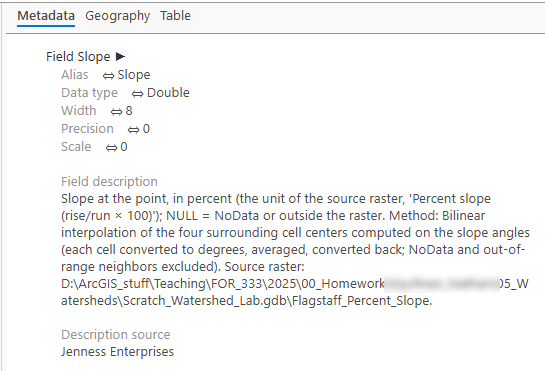
When the values go into the input, the tool's derived output, Updated input point features, carries the input with its new field to the next tool in a model.
Coordinate systems
The points are read in the raster's coordinate system. Point coordinates can be reprojected exactly, while projecting a raster resamples every cell and damages the values, so the raster is never projected, and the points and raster may be in different coordinate systems without harm. When the two are on different datums, such as NAD27 points on a NAD83 raster, the points are moved with a datum transformation as well, and the run messages name the transformation used; without one, points can land 100 m or more from their true cells. The raster is read only over the extent of the points, with a margin of cells around it, so a regional raster with a small cluster of points is handled quickly. Projected and geographic rasters both work, since a point's containing cell and its four neighboring cell centers are found the same way in either. See Projecting Rasters for why the raster is left alone.
A tour of the dialog
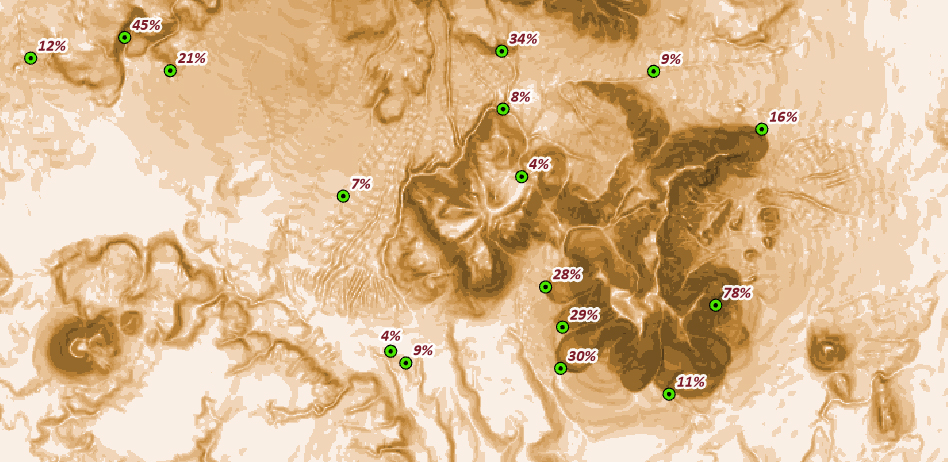
The dialog asks for the points, the slope raster, and where to write the values; for a new feature class, an output name is suggested from the input, and for the input itself the output name row disappears. Below those are the Interpolate checkbox, the output field name, and the units drop-down, which fills itself in from the raster's history when it can and warns when your choice disagrees with it. The checkbox and field name are remembered from run to run; the write-to choice always starts at a new feature class.
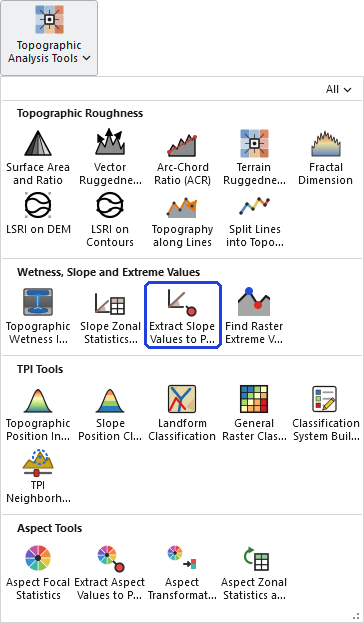
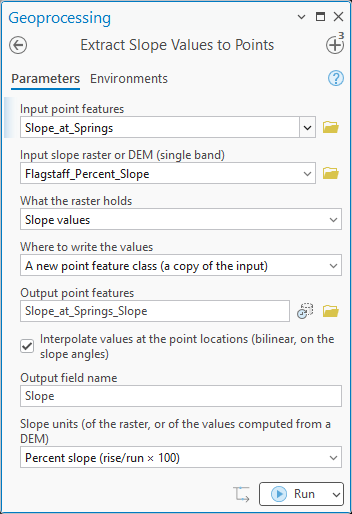
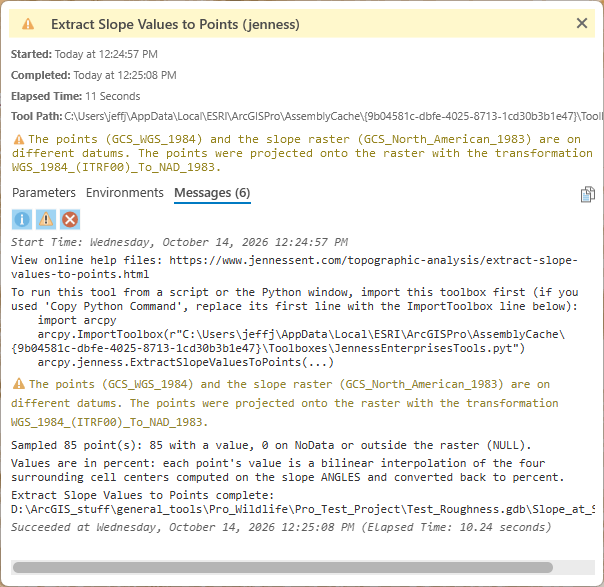
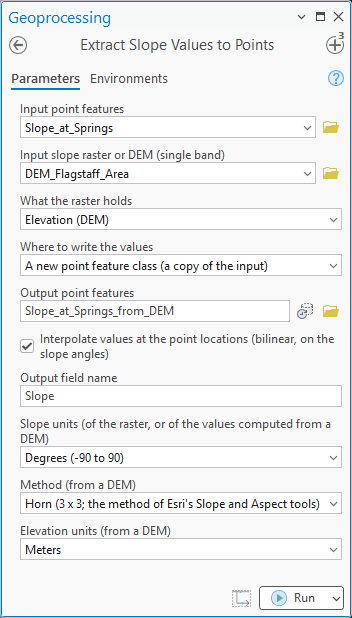
Choosing Elevation (DEM) in What the raster holds changes the pane: the units row becomes the unit of the computed values and three rows appear for the method, the window size (quadratic method only) and the elevation units, the last filled in and locked when the DEM has a vertical coordinate system.
ModelBuilder
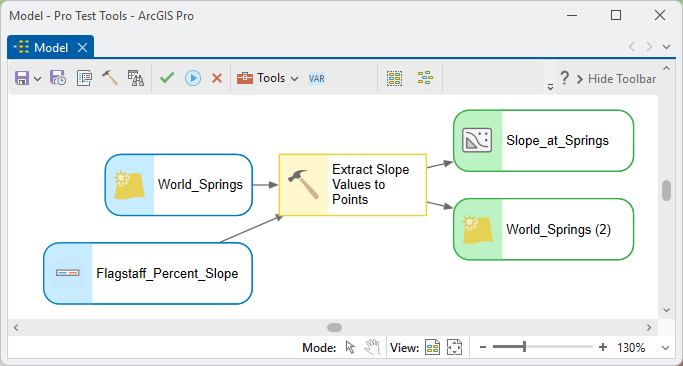
In a model the tool behaves like Esri's: the output feature class is the element to connect onward. When the values go into the input, connect the derived Updated input point features element instead.
Parameters
| Label | Explanation | Data type |
|---|---|---|
| Input point featuresRequired · in_points | The points to extract slope for. An active selection and a definition query are honored. Single-point features only; multipoint feature classes are not accepted. | Feature Layer |
| Input slope raster or DEM (single band)Required · in_raster | A single-band slope raster in degrees, percent slope, rise:run ratio or gradians (the unit is read from the raster's geoprocessing history when it is recorded there and set in the units drop-down), or a DEM with the next parameter set to Elevation (DEM). | Raster Layer |
| What the raster holdsRequired · surface_type | Slope values, the default, or Elevation (DEM), which makes the tool compute the slope from the elevations by the method chosen below (see Computing from a DEM). | String |
| Where to write the valuesRequired · write_to | A new point feature class (a copy of the input), the default, or A new field in the input feature class, which adds the field to the input itself and disables the output name. | String |
| Output point featuresOptional · out_points | The new point feature class: a copy of the input points with all their attributes plus the new slope field. A name is suggested from the input. Required when the values go to a new feature class; ignored when they go into the input. | Feature Class |
| Interpolate values at the point locations (bilinear, on the slope angles)Optional · interpolate | Unchecked (default): each point gets the value of the cell it falls in, as stored. Checked: each point gets the bilinear interpolation of the four surrounding cell centers computed on the slope angles and converted back to the raster's unit, with NoData and out-of-range neighbors left out and the weights renormalized. | Boolean |
| Output field nameOptional · field_name | The name of the new DOUBLE field. Default Slope; adjusted if the name is not valid for the workspace or is already in use, with a warning in the dialog when the input already has a field of that name. | String |
| Slope units (of the raster, or of the values computed from a DEM)Required · slope_units | Degrees (-90 to 90), Percent slope (rise/run × 100), Rise:run ratio or Gradians (gons). For a slope raster: set from its geoprocessing history when it records a unit, otherwise Degrees, and a choice that disagrees with the history draws a warning here and in the run report (the tool runs with the choice). For a DEM: the unit of the computed values. | String |
| Method (from a DEM)Optional · slope_method | Only when the raster is a DEM. Horn (3 x 3; the method of Esri's Slope and Aspect tools), the default, or Quadratic least squares (choose the window size); see Computing from a DEM. | String |
| Window size in cells (quadratic method)Optional · window_size | 3, 5, 7, 9, 11, 13 or 15 cells on a side for the quadratic fit; Horn's method is always 3 × 3. Default 3. | Long |
| Elevation units (from a DEM)Optional · elev_units | Meters or Feet. Filled in and locked from the DEM's vertical coordinate system when it has one; otherwise choose, since a wrong unit scales every value. | String |
| Updated input point featuresDerived · updated_points | For ModelBuilder: the input point features with their new field, filled in when the values are written into the input feature class and empty when a new feature class is made. | Feature Layer |
Python
interpolate is True or False. The write_to strings
are exactly "A new point feature class (a copy of the
input)" and "A new field in the input feature
class"; the slope_units strings are exactly
"Degrees (-90 to 90)", "Percent slope (rise/run
× 100)", "Rise:run ratio" and
"Gradians (gons)". The surface_type strings are
"Slope values" and "Elevation (DEM)", and
the slope_method strings "Horn (3 x 3; the method of
Esri's Slope and Aspect tools)" and "Quadratic least
squares (choose the window size)". The new field is DOUBLE, in
the raster's unit; NULL (geodatabase) or −9999 (shapefile) is
NoData or outside the raster.
import arcpy
arcpy.ImportToolbox(r"C:\path\to\JennessEnterprisesTools.pyt")  # your installed path is shown in this tool's run messages

# Value of the cell each point falls in, written to a copy of the points
arcpy.jenness.ExtractSlopeValuesToPoints(
    in_points=r"C:\Project\Wildlife.gdb\telemetry_points",
    in_raster=r"C:\Project\Terrain.gdb\slope_percent",
    surface_type="Slope values",
    write_to="A new point feature class (a copy of the input)",
    out_points=r"C:\Project\Wildlife.gdb\telemetry_points_Slope",
    interpolate=False,
    field_name="Slope",
    slope_units="Percent slope (rise/run × 100)")

# Angle-space bilinear interpolation, written into the input feature class
arcpy.jenness.ExtractSlopeValuesToPoints(
    in_points=r"C:\Project\Wildlife.gdb\telemetry_points",
    in_raster=r"C:\Project\Terrain.gdb\slope_percent",
    surface_type="Slope values",
    write_to="A new field in the input feature class",
    interpolate=True,
    field_name="Slope_Pct",
    slope_units="Percent slope (rise/run × 100)")

# Slope straight from a DEM: Horn's 3 x 3 method, the numbers Esri's Slope tool gives
arcpy.jenness.ExtractSlopeValuesToPoints(
    in_points=r"C:\Project\Wildlife.gdb\telemetry_points",
    in_raster=r"C:\Project\Terrain.gdb\dem",
    surface_type="Elevation (DEM)",
    write_to="A new field in the input feature class",
    interpolate=False,
    field_name="Slope",
    slope_units="Degrees (-90 to 90)",
    slope_method="Horn (3 x 3; the method of Esri's Slope and Aspect tools)",
    elev_units="Meters")

# Quadratic least squares over a 7 x 7 window, smoother on a fine lidar DEM
arcpy.jenness.ExtractSlopeValuesToPoints(
    in_points=r"C:\Project\Wildlife.gdb\telemetry_points",
    in_raster=r"C:\Project\Terrain.gdb\dem",
    surface_type="Elevation (DEM)",
    write_to="A new point feature class (a copy of the input)",
    out_points=r"C:\Project\Wildlife.gdb\telemetry_points_Slope",
    interpolate=True,
    field_name="Slope",
    slope_units="Percent slope (rise/run × 100)",
    slope_method="Quadratic least squares (choose the window size)",
    window_size=7,
    elev_units="Meters")
Recommended citation
Credits and references
By Jeff Jenness, Jenness Enterprises (www.jennessent.com). The tool is modeled on Esri's Extract Values to Points; the angle-space interpolation applies the rule of the Slope Zonal Statistics as Table tool to a single point. The DEM option uses Horn's (1981) gradient, the method of Esri's Slope tool, or the Evans–Young quadratic described by Evans (2013); the comparison of estimators is from Zhou and Liu (2004), with Skidmore (1989), Jones (1998) and Florinsky (1998) as the earlier tests.
- Esri. Extract Values to Points (Spatial Analyst). ArcGIS Pro tool reference. pro.arcgis.com. Accessed on 14 October 2026.
- Esri. How Slope works and How Aspect works. ArcGIS Pro tool reference. <https://pro.arcgis.com/en/pro-app/latest/tool-reference/spatial-analyst/how-slope-works.htm> and <https://pro.arcgis.com/en/pro-app/latest/tool-reference/spatial-analyst/how-aspect-works.htm>. Accessed 28 Sep 2026.
- Esri. Surface Parameters (Spatial Analyst). ArcGIS Pro tool reference. <https://doc.esri.com/en/arcgis-pro/latest/tool-reference/spatial-analyst/surface-parameters.html>. Accessed 16 Oct 2026.
- Evans, I. S. 2013. Land surface derivatives: history, calculation and further development. Proceedings of Geomorphometry 2013, Nanjing, China. <https://geomorphometry.org/uploads/pdf/pdf2013/Evans2013geomorphometry.pdf>. Accessed 16 Oct 2026.
- Florinsky, I. V. 1998. Accuracy of local topographic variables derived from digital elevation models. International Journal of Geographical Information Science 12:47–61. https://doi.org/10.1080/136588198242003
- Hodgson, M. E. 1995. What cell size does the computed slope/aspect angle represent? Photogrammetric Engineering & Remote Sensing 61:513–517.
- Horn, B. K. P. 1981. Hill shading and the reflectance map. Proceedings of the IEEE 69:14–47. https://doi.org/10.1109/PROC.1981.11918
- Jones, K. H. 1998. A comparison of algorithms used to compute hill slope as a property of the DEM. Computers & Geosciences 24:315–323. https://doi.org/10.1016/S0098-3004(98)00032-6
- Skidmore, A. K. 1989. A comparison of techniques for calculating gradient and aspect from a gridded digital elevation model. International Journal of Geographical Information Systems 3:323–334.
- Wood, J. 1996. The geomorphological characterisation of digital elevation models. Dissertation, University of Leicester, Leicester, United Kingdom.
- Zhou, Q., and X. Liu. 2004. Error analysis on grid-based slope and aspect algorithms. Photogrammetric Engineering & Remote Sensing 70:957–962. https://doi.org/10.14358/PERS.70.8.957
Licensing information
Works at every ArcGIS Pro license level (Basic, Standard, Advanced). No extension licenses are required; the extraction and the interpolation are computed internally, without Spatial Analyst. Esri's Extract Values to Points requires the Spatial Analyst extension at every license level.
Related tools and pages
- Slope Zonal Statistics as Table — the same angle-space rule applied to the statistics of a zone, with the full discussion of percent slope.
- Slope Graphic — a wedge-and-line graphic of slope statistics, also computed on the angles.
- Extract Aspect Values to Points — the same tool for aspect, with a circular interpolation, and the same choice of where to write the values.
- Topography along Lines — slope averaged in degrees along a line rather than at a point.
- Projecting Rasters — why the raster is read in its own coordinate system.