

Add Random Numbers
Summary
Fills a numeric field of a layer's or table's records — only the selected records when there is a selection, and only the records a definition query shows — with a constant, a random permutation of 1 to N (every record a different number: the classic way to assign treatments to plots at random), the same permutation repeated for each replicate (a case field groups the records, and every group gets its own 1 to n), random integers within a range, random decimals between 0 and 1 or within a range, or draws from a normal distribution with a given mean and standard deviation. A field that does not exist yet is created, as an integer or double-precision field to suit the values, and a seed makes the result repeatable.
Add Random Numbers is a port of the tool of the same name in the CropCentric ArcGIS tools that Jeff Jenness built with Matt Wiebers for ArcMap (Jenness and Wiebers 2018), which wrote a constant or a random permutation; the repeated permutation, the ranges, the unit interval and the normal distribution are additions.
Usage
Which records. A map layer or table view writes random numbers to only the records it sees, so setting a definition query on a layer will mean only those records get the new values. Selections are also honored, so only selected records will be modified. If you browse for a dataset on the hard drive, then all records will automatically be calculated, because datasets on the hard drive have no definition query or selection. N, for the permutation, is the number of records written; for the repeated permutation it is the size of each group.
The values.
- Constant value — the same number in every record.
- Random permutation of 1 to N — the numbers 1 to N dealt out in random order, each used once: treatment numbers for plots, a random plot order, a random visit order.
- Random permutation of 1 to N (repeated for replicates) — the records are grouped by a case field and each group is dealt its own permutation of 1 to n, n being that group's size. This is the mode for a Plot Designer output, which is one block of plots repeated as replicates: three replicates of a four-plot block get the treatment numbers 1 to 4 three times over, one random order per replicate, rather than 1 to 12 once. The case field there is Rep (the field list shows it by its alias, Replication), and the tool suggests it when the input has a field of that name. Records with no value in the case field form a group of their own.
- Random integers within a range — each record an independent whole number from the lowest to the highest value, inclusive, so repeats are possible.
- Random decimals between 0 and 1 — uniform on [0, 1).
- Random decimals within a range — uniform between the lowest and highest values.
- Random decimals from a normal distribution — Gaussian draws with the given mean and standard deviation.
How the numbers are made. Every mode draws from Python's standard random module, seeded with your seed, so the same seed with the same records reproduces any mode exactly. The uniform numbers underneath come from the Mersenne Twister (Matsumoto and Nishimura 1998), with 53 random bits per value. The permutation modes are Fisher–Yates shuffles in Durstenfeld's form (Fisher and Yates 1938; Durstenfeld 1964; Knuth 1997, Algorithm P), each index drawn by rejection sampling, so every ordering is equally likely and there is no modulo bias; the integer range is drawn the same way. Random numbers generated from a Normal distribution use the Box–Muller transform in its original trigonometric form (Box and Muller 1958), not the polar variant: from two uniform values U1 and U2 on [0, 1) it forms
two independent standard-normal values, which serve two successive records and are scaled by the mean and standard deviation you give. The run messages and the field's metadata record the method used, so a methods section can name it.
The field. The field list offers the input's writable numeric fields (the ObjectID, the geometry and read-only measures such as Shape_Length are left out); pick an existing field to write the new values in place, or type a name of your own. Integer fields take only the integer modes and whole-number constants. The dialog will stop you if you try to write a decimal number, or a constant with a decimal part, into an integer field. A name that does not exist yet is created as a LONG field for integer values or a DOUBLE field for decimals, shortened to ten characters on a shapefile or dBASE table. The default name, Treatment, matches the empty field that Create Array along Axes leaves for it.
Repeatability. Give a seed to get the same numbers again; leave it empty for a fresh draw each run. The run is recorded in the geoprocessing History either way.
A worked example
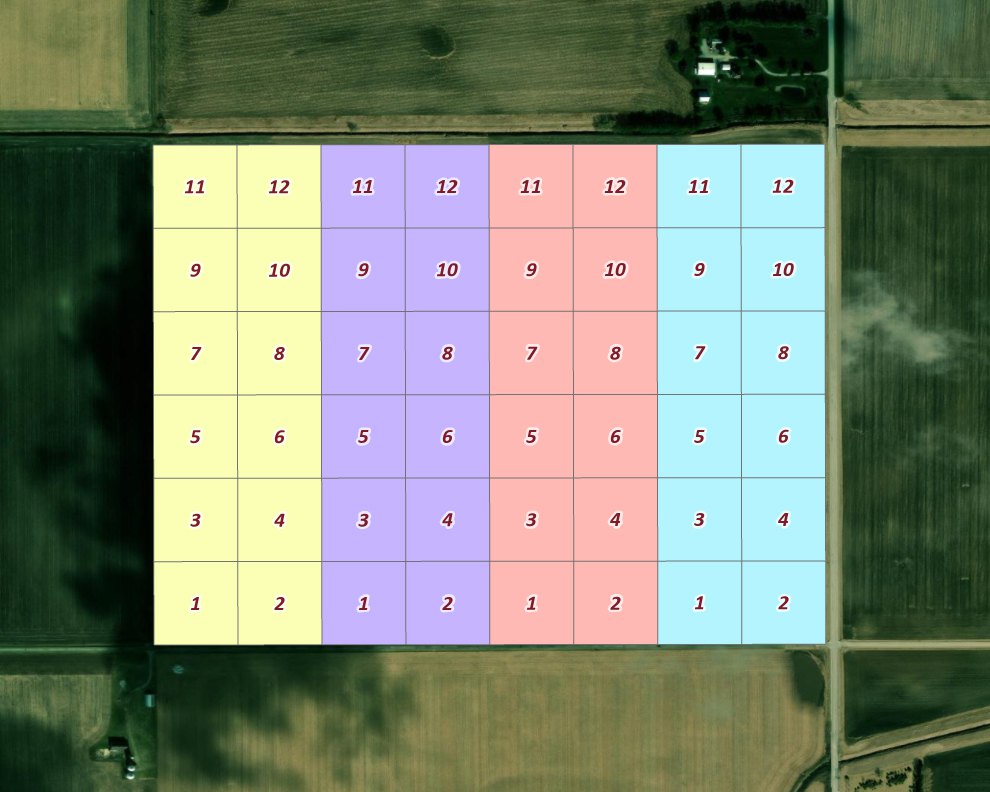
We used Plot Designer to lay out our plots: four replicates of a 2 by 6 design, the replicates numbered 1 through 4 and the plots within each replicate numbered 1 through 12, 48 plots in all.
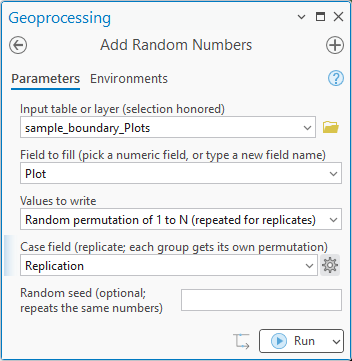
We want to test the plots with some treatment and use the plot numbers to identify the treatments, but the current arrangement is likely to skew the results just because of the way the field itself varies over the landscape. The effects we see from treatments 1 and 2, for example, might be due to the fact that they are all on the southern edge of the field. We want to scramble those treatment numbers within each replicate, so we run the tool with Random permutation of 1 to N (repeated for replicates), writing into the Plot field itself, with the replicate number as the case field. The field list shows that field by its alias, Replication.
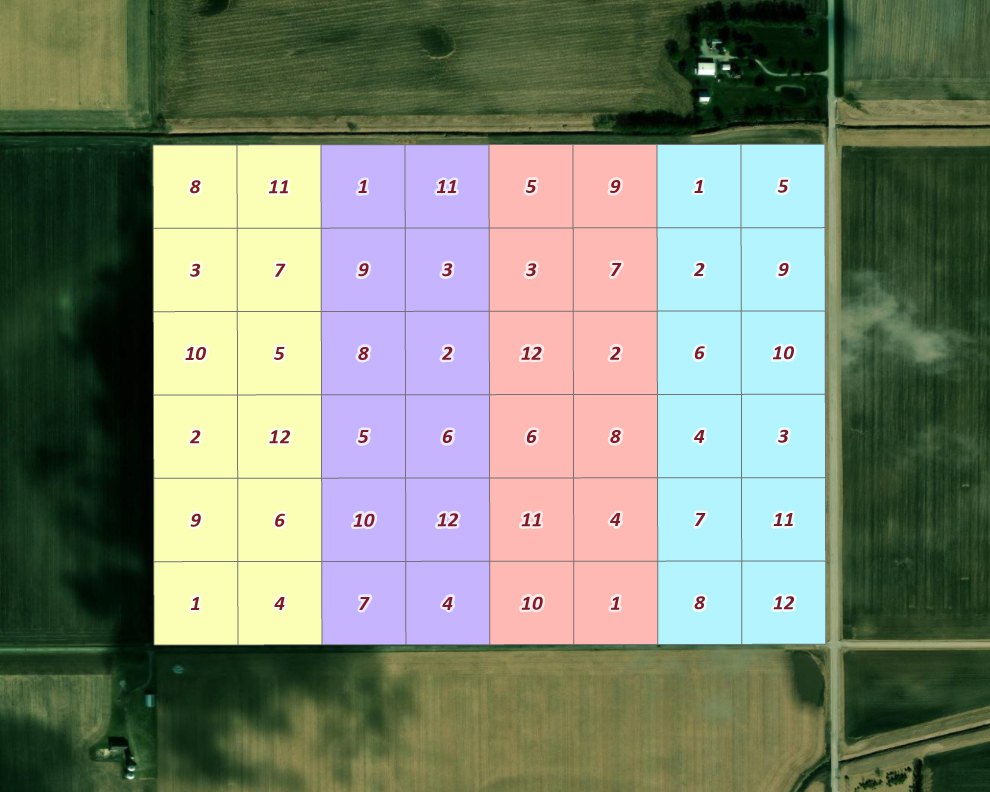
Every replicate still holds each number from 1 to 12 once, but in its own random order, so no treatment is tied to one edge of the field:
If we want to give a random unique ID number to every plot instead, we use Random permutation of 1 to N (each record unique), which needs no case field:
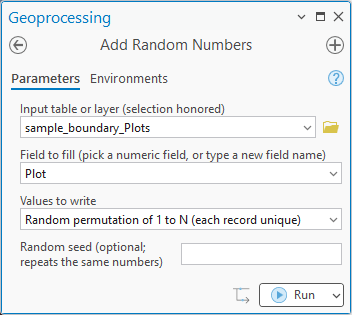
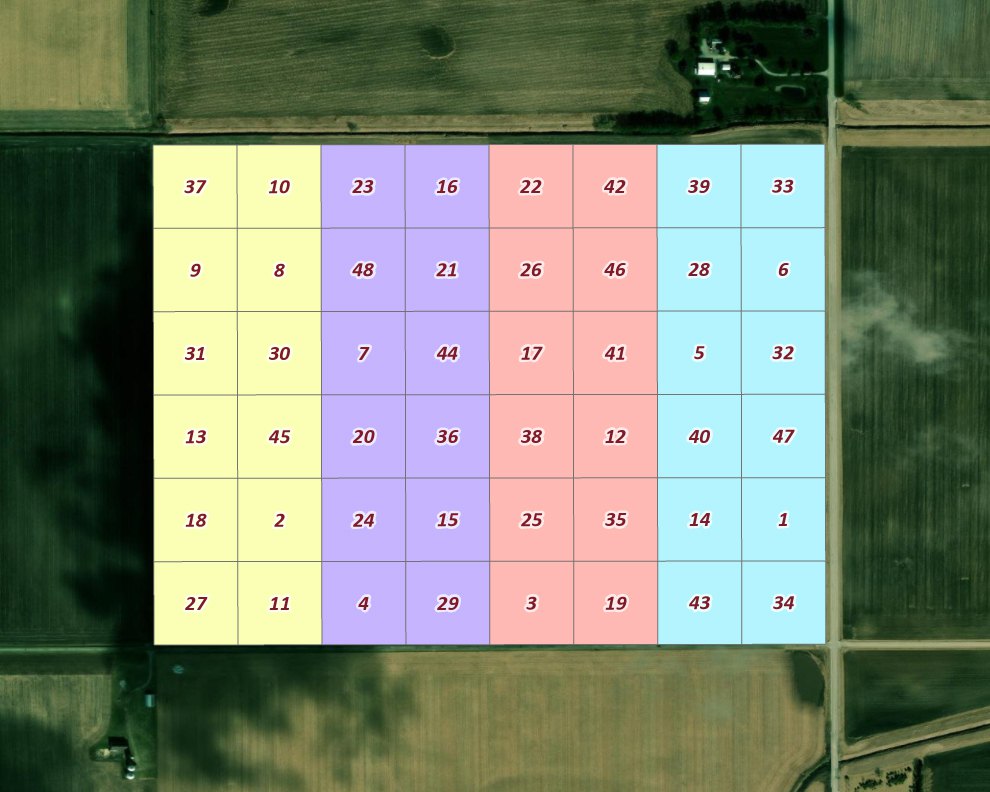
The tool will also generate random numbers from a normal distribution, and the other kinds described above, which you might want for many statistical and analytical purposes.
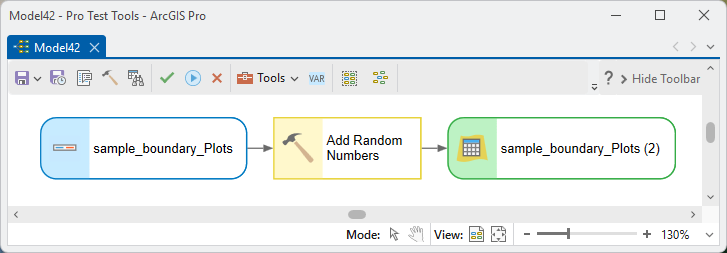
In ModelBuilder the tool takes the layer in and hands the same layer on, updated, for the next step:
Parameters
| Label | Explanation | Data type |
|---|---|---|
| Input table or layerRequired · in_table | The layer, table view, feature class or table whose records are written. A layer's selection and definition query are honored. | Table View |
| Field to fillRequired · field | Pick one of the input's writable numeric fields to fill it in place, or type a new field name, created to suit the values. An integer field refuses decimal modes and constants with a decimal part. | String |
| Values to writeRequired · mode | Constant value; Random permutation of 1 to N (each record unique); Random permutation of 1 to N (repeated for replicates); Random integers within a range; Random decimals between 0 and 1; Random decimals within a range; Random decimals from a normal distribution (mean, standard deviation). | String |
| Case fieldOptional · case_field | For the repeated-permutation mode: the field whose values identify the replicates. Each distinct value is dealt its own permutation of 1 to n, n being the number of records with that value. Suggested as Rep when the input has that field. | Field |
| Constant valueOptional · constant | The value for the constant mode. | Double |
| Lowest value, highest value of the rangeOptional · low, high | The range for the two range modes; inclusive for integers. | Double |
| Mean, standard deviationOptional · mean, sd | The normal distribution's parameters; the standard deviation cannot be negative. | Double |
| Random seedOptional · seed | Any whole number. The same seed with the same records gives the same numbers again. | Long |
| Updated tableDerived · out_table | The input, after writing, for chaining in ModelBuilder. | Table View |
Python
Deal the treatment numbers 1 to n afresh within every replicate of a Plot Designer output, whose Rep field is the case field:
import arcpy
arcpy.ImportToolbox(r"C:\path\to\JennessEnterprisesTools.pyt")  # your install path
arcpy.jenness.AddRandomNumbers(
    in_table=r"D:\data\trial.gdb\Plots_2026", field="Treatment",
    mode="Random permutation of 1 to N (repeated for replicates)",
    case_field="Rep", seed=42)
Deal 1 to N to the plots of replication 2 alone, in random order:
arcpy.management.MakeFeatureLayer(r"D:\data\trial.gdb\Plots_2026", "plots")
arcpy.management.SelectLayerByAttribute("plots", "NEW_SELECTION", "Rep = 2")
arcpy.jenness.AddRandomNumbers(
    in_table="plots", field="Treatment",
    mode="Random permutation of 1 to N (each record unique)", seed=42)
Recommended citation
Credits and references
By Jeff Jenness and Matt Wiebers, Jenness Enterprises (www.jennessent.com). A port of the Add Random Numbers tool of the CropCentric ArcGIS tools for ArcMap (Jenness and Wiebers 2018), with the range, unit-interval and normal-distribution modes added. The random numbers come from Python's standard random module: Mersenne Twister uniforms (Matsumoto and Nishimura 1998), Fisher–Yates shuffles (Fisher and Yates 1938; Durstenfeld 1964; Knuth 1997) and the Box–Muller transform (Box and Muller 1958).
The basemap under the maps in the figures on this page is Esri's World Imagery basemap (source: Esri, Vantor, Earthstar Geographics, and the GIS User Community).
- Box, G. E. P., and M. E. Muller. 1958. A note on the generation of random normal deviates. Annals of Mathematical Statistics 29:610–611. https://doi.org/10.1214/aoms/1177706645
- Durstenfeld, R. 1964. Algorithm 235: random permutation. Communications of the ACM 7:420. https://doi.org/10.1145/364520.364540
- Esri. 2026. World Imagery [basemap]. ArcGIS Online, Esri, Redlands, California. arcgis.com/home/item.html?id=10df2279f9684e4a9f6a7f08febac2a9. Accessed on 18 October 2026.
- Fisher, R. A., and F. Yates. 1938. Statistical tables for biological, agricultural and medical research. Oliver and Boyd, Edinburgh, UK.
- Jenness, J., and M. Wiebers. 2018. CropCentric ArcGIS tools, version 2.2.455. Jenness Enterprises, Flagstaff, Arizona, USA.
- Knuth, D. E. 1997. The art of computer programming. Volume 2: seminumerical algorithms. Third edition. Addison-Wesley, Reading, Massachusetts, USA.
- Matsumoto, M., and T. Nishimura. 1998. Mersenne twister: a 623-dimensionally equidistributed uniform pseudo-random number generator. ACM Transactions on Modeling and Computer Simulation 8:3–30. https://doi.org/10.1145/272991.272995
Licensing information
Works at every ArcGIS Pro license level (Basic, Standard, Advanced). No extension licenses are required.
Related tools and pages
- Select Random Records — selects a random subset of records instead of numbering them.
- Plot Designer — already shuffles the rates within each replication; this tool handles any further random assignment.
- Create Array along Axes — leaves empty Treatment and Block fields for this tool to fill.
- Convert Field Units — the other field-filling tool of the Data Tools group.
- Random Point Generator — random sample points within a boundary, with spacing and stratification options.
- Random Sample Array Generator — random arrays of sample points for cluster-style designs.
- Spatially Balanced Sample (GRTS) — sample sites spread evenly over an area, with replacements in order.