

About the Add-in
Summary
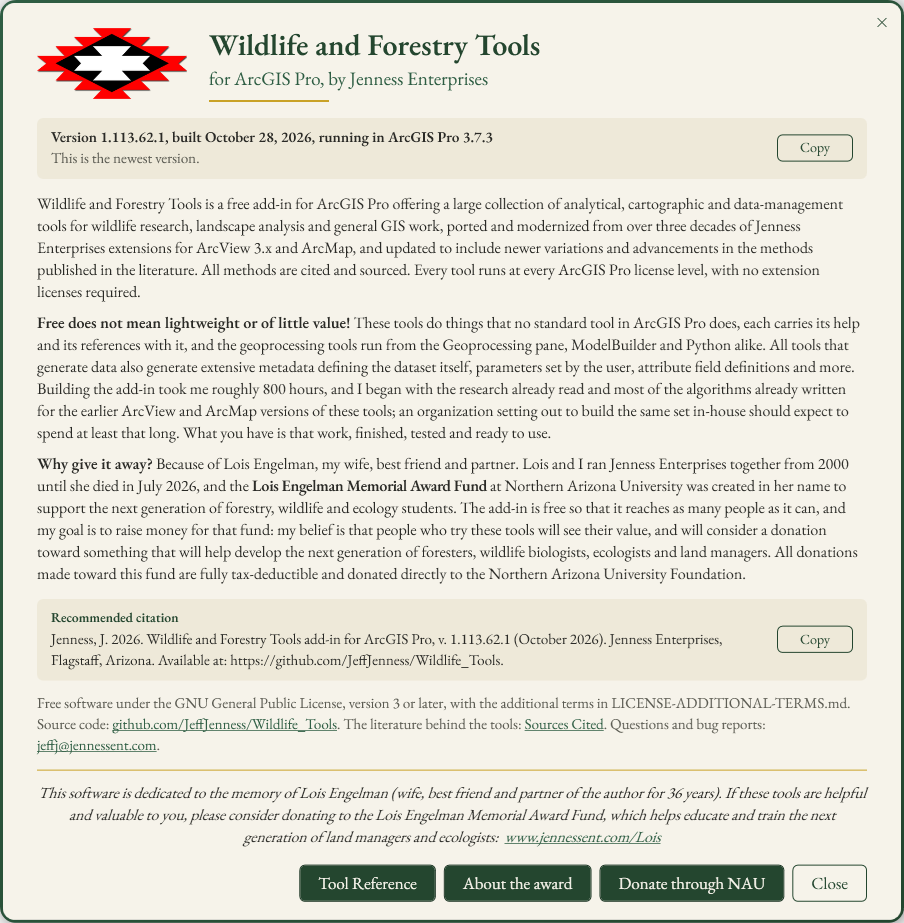
Opens a card that tells you about Wildlife and Forestry Tools: what the add-in is and what it is worth, the version you have installed and whether a newer one is available, a citation you can copy, the license and where the source code lives, and the Lois Engelman Memorial Award Fund that the add-in supports. Buttons on the card open this Tool Reference, the award page and the university's giving page.
Usage

Click About the Add-in on the ribbon. The card can be dragged anywhere on the screen, does not block ArcGIS Pro while it is open, and closes with the × in its corner or the Close button. Clicking the ribbon button again brings an open card to the front.
What the card shows
The version line. The version of the add-in you have installed, the date it was built and the version of ArcGIS Pro it is running in, for example Version 1.112.60.0, built October 13, 2026, running in ArcGIS Pro 3.7.1. The card reads these from the add-in's own files and from ArcGIS Pro, so they are always right for the copy you are running. Copy puts the line on the clipboard, ready to paste into a bug report or the methods section of a paper.
Whether a newer version exists. When the card opens it asks GitHub, where the add-in's releases are published, for the newest release and compares it with the version you have. It then says either This is the newest version or Version 1.113.61.0 is available, with a link to the release page; download the file there, close ArcGIS Pro, and double-click it to install the new version. If there is no internet connection, or GitHub does not answer within a few seconds, the card says it could not check, and nothing else changes. The check is a single request for GitHub's public release list; it sends no information about you, your computer or your project.
What the add-in is, what it is worth, and why it is free. The three paragraphs from the top of the Tool Reference page, in Jeff's words.
Recommended citation. The citation for the add-in as a whole, with the installed version and its date filled in (see below), and a Copy button. Each tool's own help page gives a citation for that tool.
License, source and contact. The add-in is free software under
the GNU General Public License, version 3 or later, with the
additional terms in LICENSE-ADDITIONAL-TERMS.md. The line
links to the source code on GitHub, to the
Sources Cited page that lists the
literature behind the tools, and to Jeff's email address for questions
and bug reports.
The dedication. The same dedication to Lois Engelman that the Lois Engelman Scholarship card carries, with its link.
The buttons. Tool Reference opens this web site at its tool reference page. About the award opens the award page. Donate through NAU opens Northern Arizona University's giving page for the fund; until the university publishes that page, the button says so instead of opening a dead link. Close closes the card.
Recommended citation
For the add-in as a whole (the card fills in the version and the date of the copy you are running):
Credits
By Jeff Jenness, Jenness Enterprises (www.jennessent.com).
Licensing information
Works at every ArcGIS Pro license level (Basic, Standard, Advanced). No extension licenses are required. The version check needs an internet connection; everything else on the card works without one.
Related tools and pages
- Tool Reference — every tool in the add-in, the download, and the three paragraphs the card repeats.
- Lois Engelman Scholarship — the award the add-in supports, and how to donate.
- Sources Cited — the literature behind the tools.
- Thought for the Day — another card in the Take a Break group.