

Unit Converter
Summary
Converts values between more than 1,200 measurement units in 23 measurement classes: Angle and Slope, Animal Unit Months (Grazing), Area, Circle Area and Diameter, Count per Area, Density, Energy/Work, Fireline Intensity (Fire), Flow Rate, Force, Heat per Area (Fire), Length and Distance, Mass per Area, Power, Pressure/Stress, Speed and Velocity, Stand Basal Area (Forestry), Temperature, Time, Tree Diameter and Basal Area (Forestry), Volume, Volume per Area, and Weight/Mass. Any unit converts to any other unit of its class, so the catalog holds well over 100,000 possible conversions, and you can add units and measurement classes of your own.
The window has three tabs. Convert Numbers converts one value at a time. Convert a Field converts every value of a numeric field in a table or layer, with the Convert Field Units tool. My Units is where your own units and classes are added.
In case you wonder what exactly a pottle or a woodland-measure is, every unit in the catalog has a definition, and the window shows the definitions of the two units you choose beside the lists.
The Unit Converter began in 2000 as a stand-alone Windows program, and this window is its modern version inside ArcGIS Pro. The units, their definitions and the idea behind them come from that program. A lot of these units are historical, and you probably won't be using them too often, but I was having fun researching measurement units back in the day and I included quite a few.
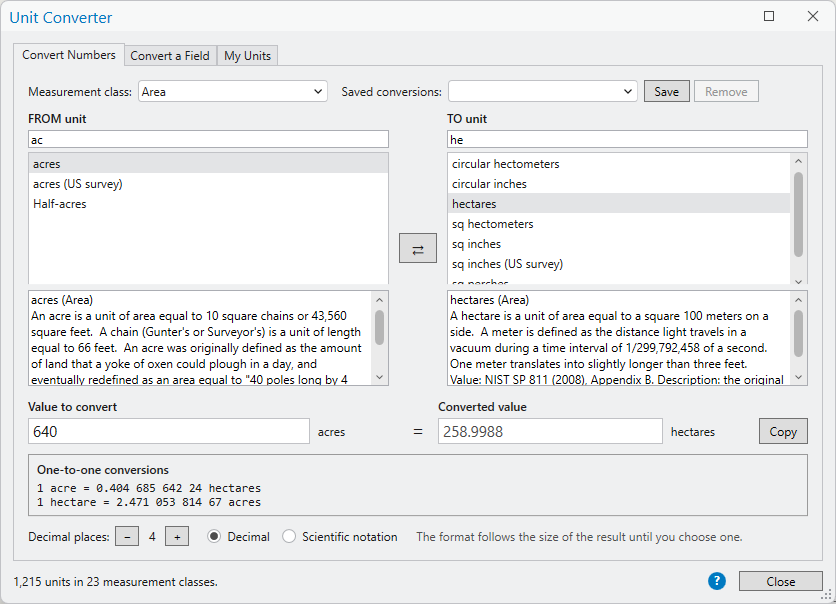
Converting numbers
Click Unit Converter in the Data Tools group of the Wildlife and Forestry tab. The window opens on the Convert Numbers tab.
- Choose a Measurement class, or type part of a unit's name in the find box above either list.
- Click the unit to convert from in the FROM unit list and the unit to convert to in the TO unit list.
- Type the number in Value to convert. The converted value appears as you type.
| Control | Explanation |
|---|---|
| Measurement class | Shows only the units of one class in the two lists. Selecting a measurement class is not required, but it saves some time: with (all classes) showing, the lists hold every unit, and clicking a unit picks its class for you, so the other list then offers only the units it can be converted to. |
| Find boxes | Each list has its own find box, just under its label. A find box shortens its list to the units whose names contain what you type, so you can look for the FROM and TO units separately: cattle above the FROM list and mule deer above the TO list. With (all classes) showing, a find box searches every class at once, and clicking a unit picks its class without emptying either box. acre finds acres, acre-feet, acre-inches, the flows measured in them and the units per acre. A class's name works too: forestry lists every unit of the forestry classes, and basal area every unit of the two basal area classes. Two words must both appear. With every class showing, each unit is listed with its class. The names ArcGIS Pro uses for its units are found too: FeetUS or Foot_US finds the U.S. survey foot, and AcresUS the U.S. survey acre. |
| FROM unit, TO unit | The unit the value is in now, and the unit to convert it to. Under each list is the definition of the unit chosen in it. |
| Reverse (⇄) | In case you select the FROM and TO units backwards, the Reverse button is a quick way to switch them. What you typed in the two find boxes switches with them. |
| Value to convert | A number in decimal form, in scientific notation (1.5e3), or as a fraction: 1/4 is 0.25. To enter a whole number and a fraction, such as 5 and 1/8, separate the whole number from the fraction with a space: 5 1/8 is 5.125, and -5 1/8 is -5.125. |
| Converted value | The result, with the TO unit's name beside it, singular for exactly 1. Copy puts it on the clipboard as shown. |
| One-to-one conversions | How many TO units make one FROM unit, and how many FROM units make one TO unit, to twelve significant digits, with commas in front of the decimal point and a space every three digits after it so a long factor is easy to read: 1 acre = 0.404 685 642 24 hectares. For temperatures, slopes and circles, whose units are not in simple proportion, these lines hold only for the value 1, and the window says so. |
| Decimal places | From 0 to 14 places in the converted value. The window opens with 4. |
| Decimal, Scientific notation | The format of the converted value. The window picks scientific notation for very large and very small results until you choose a format yourself; a new pair of units lets it choose again. |
| Saved conversions | Conversions you use often. Save adds the current FROM and TO units to the list; choosing one from the list sets both units in one step, and Remove takes it off. The list is kept with your own units and is there the next time the window opens. |
Converting a field
The Convert a Field tab converts every value of a numeric field from one unit to another, by running the Convert Field Units tool. The same conversion can be made from the Geoprocessing pane, in ModelBuilder or in Python with that tool.
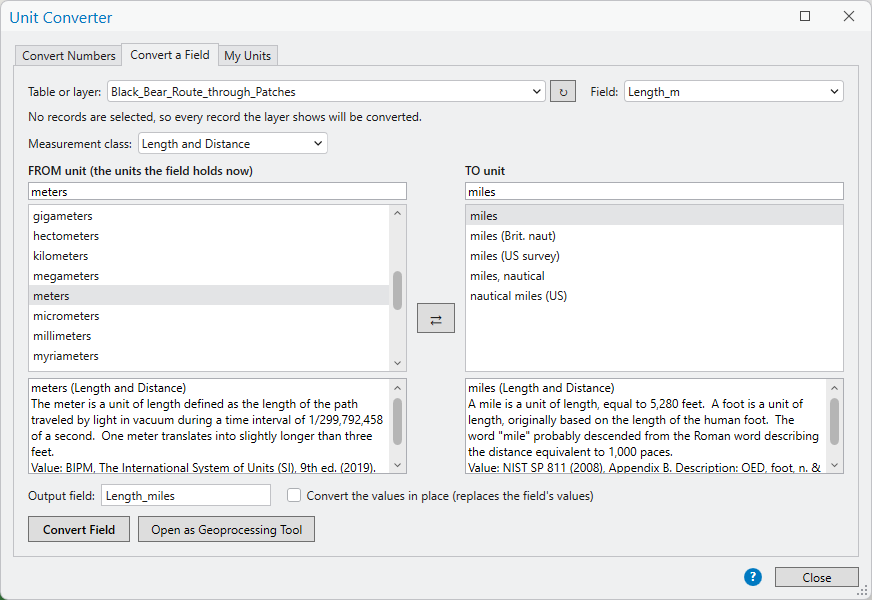
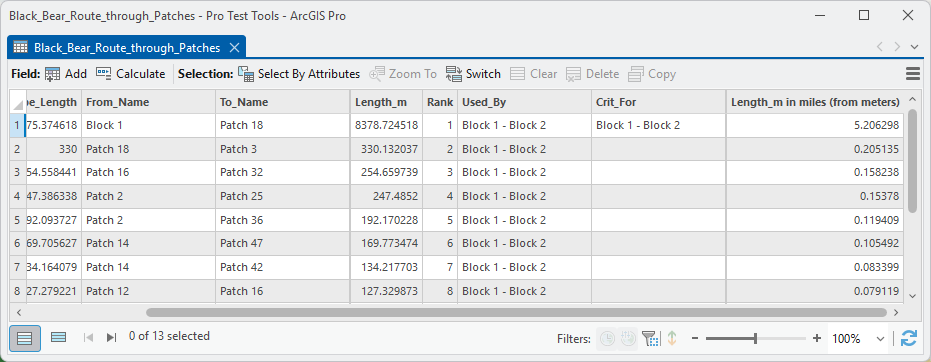
Length_m field of a set of route segments from
meters to miles, into a new field named Length_miles.
The example below follows this conversion through.| Control | Explanation |
|---|---|
| Table or layer | A layer or standalone table of the active map that has numeric fields. A layer or table selected in the Contents pane is chosen to start with; the refresh button reads the map again. The line under it says which records will be converted: only the selected records when the layer has a selection, otherwise every record the layer shows, its definition query honored. |
| Field | The numeric field whose values are converted. |
| Measurement class, find boxes, FROM and TO units | As on the Convert Numbers tab, with their own choices. The FROM unit is the unit the field's values are in now. |
| Output field | The field that receives the converted values. A name that is not a field yet becomes a new Double field, and the window suggests one from the field's name and the TO unit, no longer than 10 characters for a shapefile. The name of an existing numeric field replaces that field's values. |
| Convert the values in place | Writes the converted values back into the field itself. The old values are gone afterwards, and ArcGIS Pro's Undo does not bring back a geoprocessing edit, so keep a copy of the data or write to a new field when in doubt. |
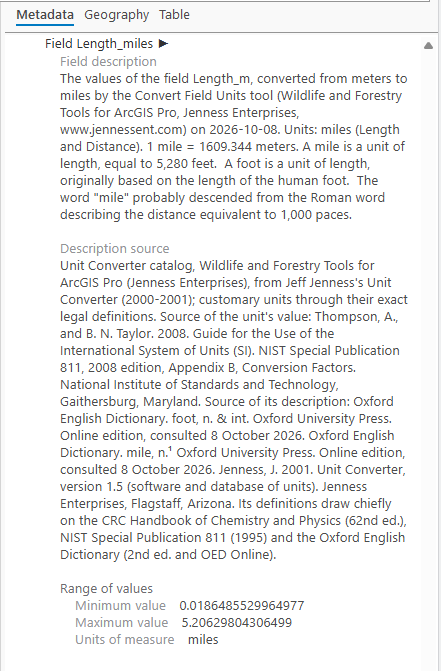
| Convert Field | Runs the Convert Field Units tool with these settings. The run is recorded in the geoprocessing History, so it can be repeated, or copied as Python. The tool also describes the field in the dataset's metadata: what it holds, the conversion that made it, and the definition of its units. |
| Open as Geoprocessing Tool | Opens the Convert Field Units tool in the Geoprocessing pane with these settings filled in. |
An example: route lengths in miles
In the
Corridor Evaluation Tutorial,
Patch Analysis
draws the black bear's route through the stepping-stone patches of
its corridor as a set of polyline segments. The tool calculates the
length of every segment, but it does so in meters, in the
Length_m field. We want the lengths in miles.
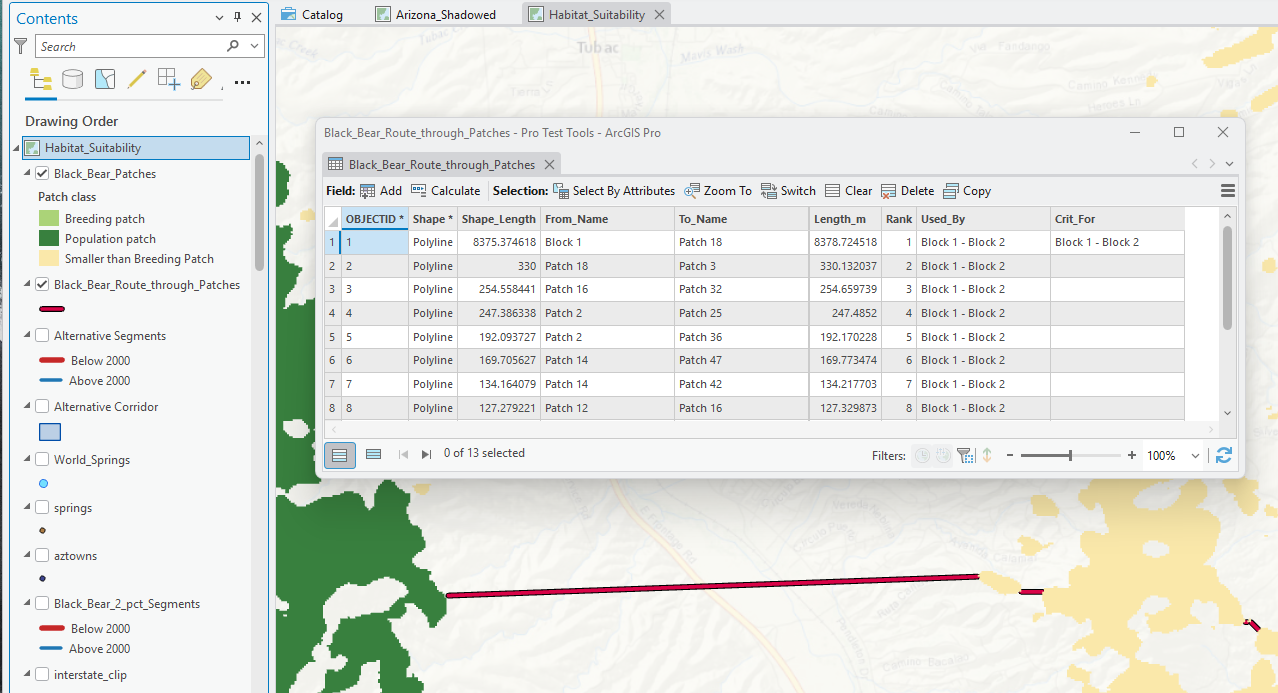
Length_m holds each segment's length in meters, the
longest 8,378.7 meters.We open the Unit Converter on its Convert a Field tab
and set it up, as in the figure above: the route layer, its
Length_m field, meters to miles, and the output field
name the window suggests, Length_miles. The line
under the layer says that no records are selected, so every
record the layer shows will be converted. We can run the
conversion now by clicking Convert Field, or click
Open as Geoprocessing Tool to pop open the
Convert Field Units
tool itself, with these settings filled in, and run it there.
Adding your own units
The My Units tab lists the units and measurement classes you have added, and adds more. A unit of your own is defined against any unit already in its class: 1 rod = 16.5 feet. From then on it converts to every unit of the class, and from every one of them, in this window and in the Convert Field Units tool.
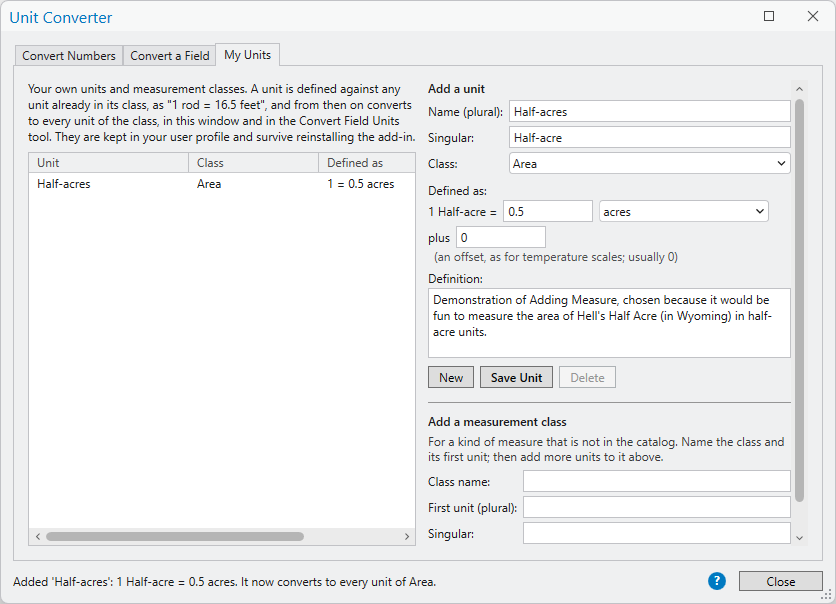
- Click New, then type the unit's name as the lists should show it, usually plural (rods), and its singular (rod).
- Choose its Class, then fill in Defined as: how many of which unit of the class make one of yours. Any unit of the class will do, including another unit of your own, and the number may be a fraction.
- Leave plus at 0, unless the unit is on a scale that does not start at zero, as temperature scales do.
- Write its Definition, and click Save Unit.
Choose one of your units in the list to edit or delete it. A unit that others are defined against cannot be deleted until they are deleted or defined against something else; renaming it keeps them working.
Add a measurement class makes a class for a kind of measure the catalog does not have. Name the class and its first unit; then add its other units above, defined against that first unit or against each other. Units of different classes never convert into each other.
Your classes, units and saved conversions are kept in one file
in your user profile,
%LOCALAPPDATA%\JennessEnterprises\WildlifeTools\unit_converter\my_units.json,
so they survive reinstalling the add-in. Copying that file into
the same folder on a colleague's computer gives them your units
too, in place of any of their own.
An example: half-acres
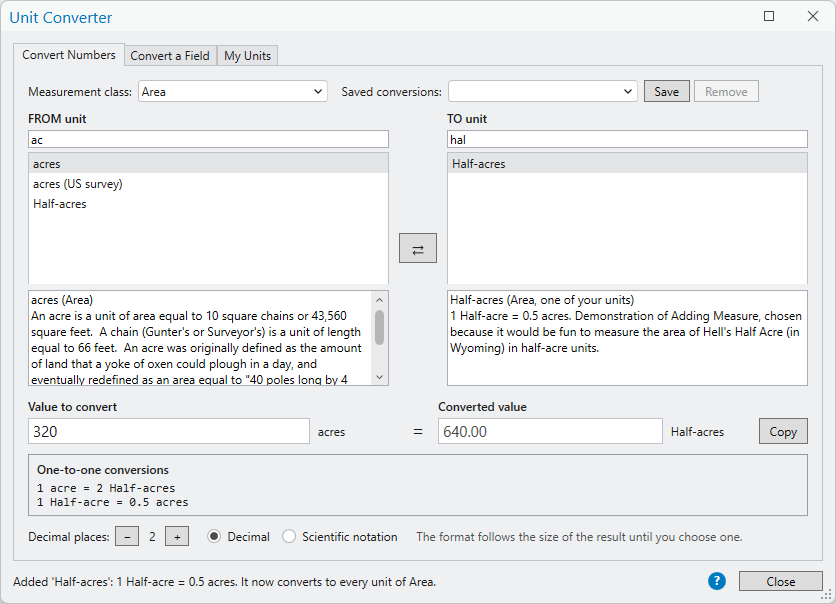
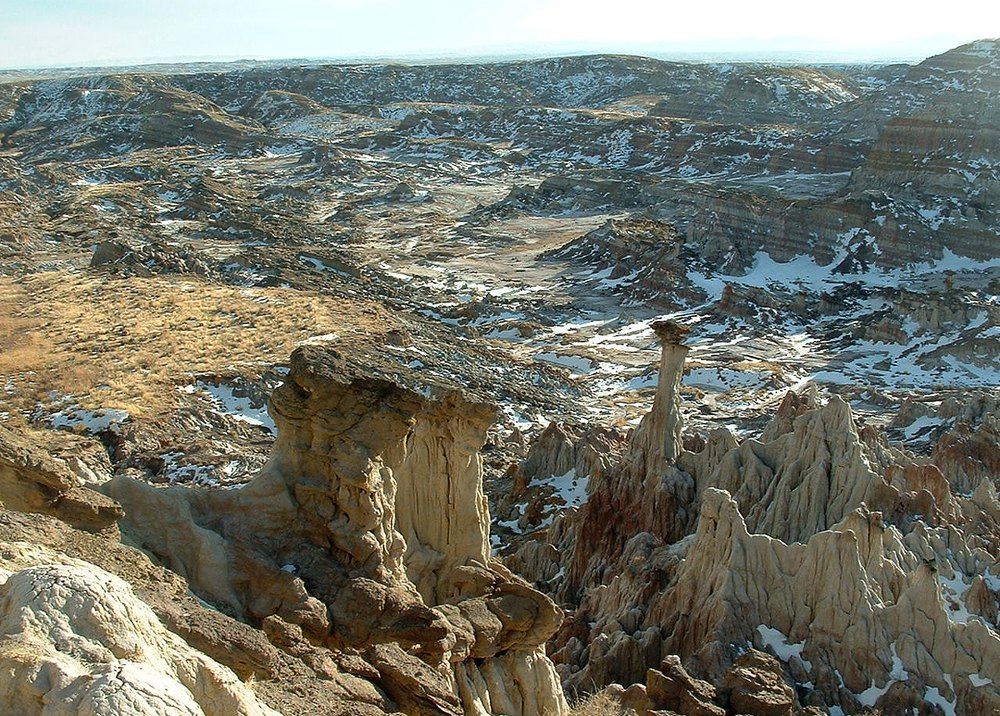
I think it would be fun to report the area of Hell's Half Acre, in Wyoming, in half-acre units. I set up the tool accordingly, as in the figure above, and now I have a new area unit that converts to and from all other area units. Wikipedia gives the area of Hell's Half Acre as 320 acres, which the converter makes 640 half-acres, or 129.5 hectares.

How a conversion is made
Every measurement class has a base unit: meters for Length, liters for Volume, degrees Celsius for Temperature. Every unit knows how to become its class's base unit and how to come back from it, so a conversion is two steps: from the FROM unit to the base, and from the base to the TO unit. Inches to millimeters goes from inches to meters and from meters to millimeters.
The original program made the same conversion in three steps: from the FROM unit to one of a few primary units of its class (inches to feet), from that primary unit to another primary unit (feet to meters), and from there to the TO unit (meters to millimeters). Every unit carried a secondary conversion to a primary unit, and a table held the primary conversions between them. Folding the middle step into each unit gives the same answers with one fewer step to maintain, and lets a unit of your own be defined against any unit of its class rather than against a primary one.
Most units are in simple proportion to the base, so the conversion is a single factor. Four kinds are not, and the window handles each exactly:
- Temperatures have different zero points, so each carries an offset as well as a factor: 212 degrees Fahrenheit is 100 degrees Celsius.
- Percent slope in the Circular class is the tangent of the angle times 100: a 100 percent slope is 45 degrees.
- Circle diameters and circumferences in the Circular Area class convert to the area of the circle: a circle 1 meter across covers π/4 square meter.
- Tree diameters in the dbh (Forestry) class convert to the basal area of the tree in the same way.
A negative area has no diameter, so converting one gives no value.
Classes for wildlife, forestry and fire
Besides the classes of the original program, the catalog has classes for the quantities field biologists, foresters and fire managers work with, every factor built from exact definitions:
- Count per Area: trees, stems, seedlings, animals, nests or anything else counted, per square meter, square foot, square yard, acre, hectare, square kilometer or square mile, and per the common fixed-area plots (1/10, 1/20 and 1/50 acre, and 1/100 hectare).
- Volume per Area: wood volume per acre or hectare, in cubic feet, cubic yards and cubic meters, board feet, MBF, cunits, cords and steres.
- Mass per Area: fuel loading, biomass, forage or yield, in kilograms or tonnes per hectare, kilograms or grams per square meter, pounds or tons per acre, pounds per square foot and ounces per square yard.
- Density: mass per unit of volume, as for wood, soil, water or snow: kilograms per cubic meter, grams per cubic centimeter, grams and kilograms per liter, tonnes per cubic meter, and pounds per cubic foot, cubic inch, cubic yard and gallon.
- Fireline Intensity (Fire): Byram's fireline intensity, in kilowatts, watts or megawatts per meter, BTU per foot per second or minute, and kilocalories per meter per second.
- Heat per Area (Fire): heat released or received per unit of area, in joules, kilojoules and megajoules per square meter, BTU per square foot, calories per square centimeter, kilocalories per square meter and langleys.
The Volume class has the cunit (100 cubic feet of solid wood) and the MBF and MMBF (a thousand and a million board feet) as well, and the Speed and Velocity class has chains per hour and per minute, for the rate of spread of a fire. A board foot here is 144 cubic inches, a nominal volume; the board feet a log rule estimates from a log's size depend on the log, so log rules are not in the catalog.
Animal unit months
The Animal Unit Months (Grazing) class converts grazing use and forage. An animal unit is a 1,000-pound cow with a calf 6 months old or younger by her side, and an animal unit month (AUM) is the forage it eats in one month. That is the definition of the NRCS handbook, which NDSU follows; the Society for Range Management's glossary lets the cow be either dry or with her calf, and the Bureau of Land Management's regulation says only one cow or its equivalent. The class has animal unit days, months and years; 78 units for a month of grazing by one animal of a kind and class of livestock or wildlife, from five published tables of animal unit equivalents; the head month of the federal grazing fees; and pounds and kilograms of forage at five amounts per AUM.
The animal units are named for the animal first and their source last, so each animal's units sit together in the lists: mule deer months (mature; NRCS) is a month of grazing by one mature mule deer at the NRCS equivalent. The five sources, by the short names in the units:
- NDSU: Table 1 of North Dakota State University Extension's Determining Carrying Capacity and Stocking Rates for Range and Pasture in North Dakota (Meehan and others 2018), which adapts the NRCS handbook. It has cattle by weight, bison, and the white-tailed jackrabbit and prairie dog.
- NRCS: Table H-12 of the NRCS National Range and Pasture Handbook (2022).
- Vallentine: Vallentine (1990, page 279), as Rangelands Gateway tabulates it, with ten classes of cattle by age.
- Holechek: Table 3 of New Mexico State University Extension Guide B-829 (Spackman and Ward 2023), after Holechek (1988): each animal's daily intake against a 1,000-pound cow eating 20 pounds of dry matter a day, with the donkey, moose and caribou.
- Arizona: Table 1 of Ruyle and Ogden (1993), which counts the animals per animal unit by the ratio of metabolic weights; each equivalent is the reciprocal of that count.
The NDSU publication's worked examples reproduce exactly: 100 cows of 1,200 pounds with calves for 5.5 months are 632.5 AUM. Its Example 1 counts four mature bulls at 1.50, the equivalent of a mature bison bull; the converter uses Table 1's 1.40 for a mature cattle bull.
| Animal | NDSU | NRCS | Vallentine | Holechek | Arizona |
|---|---|---|---|---|---|
| Cow with calf | 1.00 | 1.00 | 1.35 | ||
| Cow, dry (no calf) | 0.92 | 0.92 | 1.00 | ||
| Cow, 1,000 lb, calf not stated | 1.00 | 1.00 | |||
| Cattle, mature bull | 1.40 | 1.35 | 1.50 | ||
| Bison | 1.00 | 1.00 | 1.80 | ||
| Horse | 1.25 | 1.25 | 1.25 | 1.80 | 1.08 |
| Donkey | 1.05 | ||||
| Sheep | 0.20 | 0.20 | 0.20 | 0.15 | 0.20 |
| Goat | 0.15 | 0.15 | 0.10 | ||
| Bighorn sheep | 0.20 | 0.20 | 0.18 | ||
| Elk | 0.60 | 0.60 | 0.65 | 0.70 | 0.68 |
| Moose | 1.20 | ||||
| Caribou | 0.40 | ||||
| Mule deer | 0.20 | 0.20 | 0.23 | 0.15 | 0.21 |
| White-tailed deer | 0.15 | 0.15 | 0.17 | 0.10 | |
| Pronghorn antelope | 0.20 | 0.20 | 0.17 | 0.12 | 0.16 |
| White-tailed jackrabbit | 0.02 | ||||
| Prairie dog | 0.004 |
How many mule deer eat as much forage as one animal unit, the cow of the definition? Convert one animal unit month to a source's mule deer months: 5.0 by NDSU and NRCS, 4.3 by Vallentine, 6.7 by Holechek for a 150-pound deer, and 4.7 by Arizona for a 125-pound deer. Whether that cow has her calf with her depends on the source: NDSU and NRCS count the cow with her calf as the unit and a dry cow as 0.92, while Vallentine counts the non-lactating cow as the unit and the cow and calf pair as 1.35. Take both units from the same source, because the sources rest on different assumptions. The equivalents also compare the amount of forage, not the kind: deer prefer browse and cattle prefer grass, so the direct substitution of about five deer for one cow is rarely observed (Rangelands Gateway).
The forage in an AUM differs among agencies and regions, and that is the most common source of differences between AUM figures. Each amount is its own unit, named for its pounds per AUM, so choose the one your agency uses:
- 913 pounds of air-dried forage, about 30 pounds a day (NDSU Extension; Meehan and others 2018).
- 800 pounds of air-dried forage, 31 days at 26 pounds a day (University of Arizona Cooperative Extension; Ruyle and Ogden 1993, who add that 600 to 1,000 pounds per AUM are common values).
- 790 pounds of oven-dry forage, 26 pounds a day (the NRCS National Range and Pasture Handbook).
- 780 pounds of oven-dry forage, 26 pounds a day for a standardized month of 30 animal unit days (the Society for Range Management's glossary, as its Rangeland Assessment and Monitoring Committee quoted it in 2017).
- 750 pounds of air-dried forage, 2.5 percent of a 1,000-pound cow's weight a day for 30 days (University of Wyoming Extension; Stam and others 2018).
Animal unit days follow the NRCS handbook, whose animal unit year is both 12 animal unit months and 365 animal unit days, so a month is 365/12, or 30.42 days.
Federal grazing fees count head, not forage. For its fees the Bureau of Land Management counts a month's grazing by one cow, bull, steer, heifer, horse, burro or mule as one AUM, and a month by five sheep or five goats as one AUM too (43 CFR 4130.8-1). The Forest Service counts head months the same way (36 CFR 222.50), and the two agencies treat the head month and the AUM as the same measure for fees. The head months (federal grazing fees) and sheep or goat months (federal grazing fees) units hold that count: 100 horses for 2 months are 200 head months, while the NDSU equivalent of 1.25 for a mature horse makes the same grazing 250 AUM of forage. Where your agency's equivalents differ from these, add your own units in the My Units tab.
Units and their definitions
Every unit is converted through its exact definition wherever one exists: the international foot of exactly 0.3048 meter, the U.S. gallon of 231 cubic inches, the imperial gallon of 4.54609 liters, the avoirdupois pound of 0.45359237 kilogram, and the pound-force of that pound under standard gravity, 9.80665 meters per second squared. The foot-pound, the horsepower of 550 foot-pounds per second, the pound per square inch and their relatives are built from those, the knot is exactly 1.852 kilometers per hour, and the electron-volt has its exact value of the 2019 SI. Where no exact definition exists (the British thermal unit at 39 °F, or the volume of the Earth), the factor comes from a published table, and results beyond about the eighth significant digit should not be trusted for that unit.
The U.S. survey foot, 1200/3937 meter, was retired by the National Institute of Standards and Technology and the National Geodetic Survey at the end of 2022; since then, U.S. measurements use the international foot. The survey foot and the units built on it (the U.S. survey inch, yard, mile, chain, link and rod, and the U.S. survey acre and square feet, yards and miles) are kept for older surveys and records, and their definitions say so.
The international electrical units, marked (Int), were used before the present SI units: the international joule and the international watt are each 1.000165 of the SI unit (CRC Handbook of Chemistry and Physics, 62nd edition). The National Bureau of Standards gave the same factor for the international joule and watt as maintained in the United States when it announced the change to the present units (NBS Circular C459, 1947). They are not the same as the (IT) units, the International Table calorie and British thermal unit.
The catalog also holds every length and angle unit ArcGIS Pro offers for coordinate systems, from the EPSG and Esri entries of the PROJ database that Pro installs: the historical feet, yards, chains and links of Clarke, Sears, Benoit and the Indian surveys, the Gold Coast foot, the German legal meter, the Texas vara, the angular mil, the microradian and the centesimal minute and second, among others. Each such unit's definition gives its EPSG code, and its ArcGIS name is one of the names the find boxes search.
Sources
Each unit's definition ends with its sources: the body that maintains the unit's current standard, or a publication that states or confirms its value. In 2026 every unit was compared with the conversion tables of the National Institute of Standards and Technology (NIST Special Publication 811 and Handbook 44); 260 units matched, and they cite NIST. A few that did not were corrected to NIST's values: the U.S. dry measures (now built from the Winchester bushel of 2,150.42 cubic inches), the slug and the poundal, and the conventional mercury units, which now use NIST's conventional millimeter of mercury rather than the torr. Units whose definitions come from the original program, and that no current standard covers, cite only the original Unit Converter.
A standard confirms a unit's value, not the rest of its description. The descriptions of the original program, with the word origins and histories of the older units, are its own, so a unit that also has a standard lists the two separately, as the acre does: Value: NIST Handbook 44 (2026), Appendix C. Description: OED, acre, n.; the original Unit Converter (Jenness 2001).
Many of the word origins and histories came from the full Oxford English Dictionary. In 2026 the descriptions were compared with the dictionary's entries, and a description the entry confirms cites that entry. Where an entry differed, the description was corrected to it: the origins of the words gallon, firkin and tun and of the abbreviation oz, the early meaning of the grade, the years of the Winchester bushel, the pole and the rood as old English measures, the later uses of the hogshead and the fathom, and the names and dates of Fahrenheit, Celsius and Kelvin. The engineer's chain is now Ramsden's, after the Alberta Geomatics Historical Society.
Units with a history of their own cite the documents that set them: the 1959 notice that fixed the international yard and pound and kept the U.S. survey foot for geodetic surveys, and the 2020 notice that retired the survey foot; the resolutions of the International Astronomical Union for the astronomical unit and the parsec; the Texas statute for the vara; the Bureau of Land Management's surveying manual for the chain, the section and the township; the 1947 circular of the National Bureau of Standards for the international electrical units; Oregon State University Extension for the cunit and the MBF; for the barn, the account of the two physicists who named it; and, for the smoot, the dictionary and MIT's own news office.
- Alberta Geomatics Historical Society. Chain, Engineer's. Web page: the engineer's chain, also called the Ramsden chain, of 100 one-foot links, made by Jesse Ramsden in 1784. https://albertalandsurveyhistory.ca/?p=2804
- American Heritage Dictionary of the English Language. Online edition. Smoot: a unit of measurement equal to five feet, seven inches (1.7018 meters). https://www.ahdictionary.com/word/search.html?q=smoot
- Bureau International des Poids et Mesures. 2019. The International System of Units (SI). 9th edition (SI Brochure). BIPM, Sevres, France. https://doi.org/10.59161/AUEZ1291
- Bureau of Land Management. 2009. Manual of Surveying Instructions for the Survey of the Public Lands of the United States. U.S. Department of the Interior, Bureau of Land Management. Chapters II and III. https://www.blm.gov/sites/default/files/Manual_Of_Surveying_Instructions_2009.pdf
- Code of Federal Regulations. Title 36, Section 222.50, Grazing fees (USDA Forest Service): a head month is a month's use by one animal, and five sheep or goats count as one head month. https://www.law.cornell.edu/cfr/text/36/222.50
- Code of Federal Regulations. Title 43, Section 4100.0-5, Definitions (Bureau of Land Management, grazing administration): an animal unit month is the forage needed to sustain one cow or its equivalent for 1 month. https://www.law.cornell.edu/cfr/text/43/4100.0-5
- Code of Federal Regulations. Title 43, Section 4130.8-1, Payment of fees (Bureau of Land Management): for fees, an animal unit month is a month's use by 1 cow, bull, steer, heifer, horse, burro or mule, or by 5 sheep or 5 goats. https://www.law.cornell.edu/cfr/text/43/4130.8-1
- General Conference on Weights and Measures (CGPM). 1901. Declaration on the unit of mass and on the definition of weight; conventional value of g(n) (3rd CGPM). Reproduced in the SI Brochure, 9th edition, Appendix 1. https://www.bipm.org/documents/20126/41483022/SI-Brochure-9-EN.pdf
- Holloway, M. G., and C. P. Baker. 1972. How the barn was born. Physics Today 25(7):9. The letter reprints their Los Alamos report LAMS-523, written in 1944. https://doi.org/10.1063/1.3070918
- International Association of Oil and Gas Producers (IOGP). EPSG Geodetic Parameter Dataset and Registry, units of measure, as installed with ArcGIS Pro in its PROJ database. https://epsg.org
- International Astronomical Union. 2012. Resolution B2 on the re-definition of the astronomical unit of length. XXVIII General Assembly, Beijing. https://iauarchive.eso.org/static/resolutions/IAU2012_English.pdf
- International Astronomical Union. 2015. Resolution B2 on recommended zero points for the absolute and apparent bolometric magnitude scales, footnote 4 (the parsec is exactly 648,000/pi astronomical units). XXIX General Assembly, Honolulu. https://iauarchive.eso.org/static/resolutions/IAU2015_English.pdf
- International Astronomical Union. Measuring the Universe: the IAU and astronomical units. Web page, IAU archive. The light-year is the distance light travels in a vacuum in one Julian year of 365.25 days, 9,460,730,472,580.8 kilometers. https://iauarchive.eso.org/public/themes/measuring/
- Jenness, J. 2001. Unit Converter, version 1.5 (software and database of units). Jenness Enterprises, Flagstaff, Arizona. Its definitions draw chiefly on the CRC Handbook of Chemistry and Physics (62nd ed.), NIST Special Publication 811 (1995) and the Oxford English Dictionary (2nd ed. and OED Online).
- Judson, L. V. 1976. Weights and Measures Standards of the United States: A Brief History. NBS Special Publication 447 (first issued 1963, updated 1976). National Bureau of Standards, Washington, D.C. Appendix 4, The International Nautical Mile. https://nvlpubs.nist.gov/nistpubs/Legacy/SP/nbsspecialpublication447.pdf
- Meehan, M., K. K. Sedivec, J. Printz, and F. Brummer. 2018. Determining Carrying Capacity and Stocking Rates for Range and Pasture in North Dakota. R1810 (revised November 2018). North Dakota State University Extension, Fargo. Table 1, Animal unit equivalents (AUE) guide, adapted from the NRCS National Range and Pasture Handbook (1997) and Montana State University (1993).
- MIT News. 1998. Graffiti briefly defaces bridge smoots. MIT Tech Talk, May 6, 1998. Massachusetts Institute of Technology, Cambridge, Massachusetts. https://news.mit.edu/1998/smoot-0506
- National Bureau of Standards. 1947. Announcement of Changes in Electrical and Photometric Units. NBS Circular C459. U.S. Department of Commerce, Washington, D.C. https://nvlpubs.nist.gov/nistpubs/Legacy/circ/nbscircular459.pdf
- National Bureau of Standards. 1959. Refinement of values for the yard and the pound. Federal Register 24:5348 (July 1, 1959). https://www.ngs.noaa.gov/PUBS_LIB/FedRegister/FRdoc59-5442.pdf
- National Bureau of Standards. 1960. Units of Weight and Measure: Definitions and Tables of Equivalents. NBS Miscellaneous Publication 233. U.S. Department of Commerce, Washington, D.C. https://nvlpubs.nist.gov/nistpubs/Legacy/MP/nbsmiscellaneouspub233.pdf
- National Institute of Standards and Technology. 2026. NIST Handbook 44: Specifications, Tolerances, and Other Technical Requirements for Weighing and Measuring Devices, 2026 edition. Appendix C, General Tables of Units of Measurement. NIST, Gaithersburg, Maryland. https://www.nist.gov/document/2026-nist-handbook-44-appendix-c
- National Institute of Standards and Technology. CODATA Internationally Recommended Values of the Fundamental Physical Constants: electron volt-joule relationship, exact since the 2019 revision of the SI. https://physics.nist.gov/cgi-bin/cuu/Value?evj
- National Institute of Standards and Technology and National Geodetic Survey. 2020. Deprecation of the United States (U.S.) survey foot. Federal Register 85:62698-62707 (October 5, 2020). https://www.govinfo.gov/content/pkg/FR-2020-10-05/pdf/2020-21902.pdf
- Natural Resources Conservation Service. 2022. National Range and Pasture Handbook. Title 190, Part 645 (June 2022): Subpart H, Livestock Nutrition, Husbandry, and Behavior, and Subpart N, Glossary of Terms. U.S. Department of Agriculture, Washington, D.C. https://rangelandsgateway.org/sites/default/files/2024-02/National%20Range%20and%20Pasture%20Handbook%20%28Part%20645%29.pdf
- Oester, P., and S. Bowers. 2009. Measuring Timber Products Harvested from Your Woodland. EC 1127 (revised December 2009). Oregon State University Extension Service, Corvallis. https://extension.oregonstate.edu/sites/default/files/documents/ec1127.pdf
- Oxford English Dictionary. Oxford University Press. Online edition, consulted 8 October 2026. Entries: acre length, n.; acre, n.; angstrom, n.; apothecary, n.; avoirdupois, n.; bar, n.⁶; barley-corn, n.; bushel, n.¹; calorie, n.; carat, n.; Celsius, n. & adj.; chaldron, n.; cord, n.¹; cubit, n.; dalton, n.²; ell, n.¹; Fahrenheit, n. & adj.; fathom, n.; Fermi, n.; firkin, n.; foot, n. & int.; furlong, n.; gallon, n.; grade, n.; grain, n.¹; hogshead, n.; horsepower, n.; hundredweight, n.; Kelvin, n. & adj.; last, n.²; league, n.¹; litre | liter, n.²; mile, n.¹; ounce, n.¹; oz, n.¹; parsec, n.; Pascal, n.; pole, n.¹; pound, n.¹; puncheon, n.²; rod, n.¹; Réaumur, n. & adj.; shekel, n.; sign, n.; ton, n.¹; troy, n.²; tun, n.¹.
- Rangelands Gateway. Animal Unit Equivalents. Web page; Table 1, Suggested factors describing animal unit equivalents for various herbivores, from Vallentine (1990). https://rangelandsgateway.org/inventorymonitoring/unitequivalents
- Rangelands Gateway. Animal Units. Web page; Table 1, Suggested animal unit conversion factors for various classes of cattle, from Vallentine (1990). https://rangelandsgateway.org/inventorymonitoring/animalunits
- Ruyle, G., and P. Ogden. 1993. What is an A.U.M.? In R. Gum, G. Ruyle, and R. Rice, editors. Arizona Ranchers' Management Guide, Rangeland Management section. Arizona Cooperative Extension, University of Arizona, Tucson. https://www.extension.arizona.edu/sites/default/files/2025-03/01_Rangeland_Management-Full-Section.pdf
- Society for Range Management Rangeland Assessment and Monitoring Committee. 2017. Does size matter? Animal units and animal unit months. Rangelands 39(1):17-19. Quotes the definitions of the Society's Glossary of Terms Used in Range Management, 4th edition (1998). https://doi.org/10.1016/j.rala.2016.12.002
- Spackman, C., and M. Ward. 2023. Estimating Carrying Capacity on Rangelands. Guide B-829. New Mexico State University Cooperative Extension Service, Las Cruces. Table 3, Forage demand of various rangeland animals, after Holechek (1988). https://pubs.nmsu.edu/_b/B-829.pdf
- Stam, B., J. D. Scasta, and E. Thacker. 2018. Animal Unit Month (AUM) Concepts and Applications for Grazing Rangelands. B-1320. University of Wyoming Extension, Laramie. https://wyoextension.org/publications/html/B1320/
- Texas Natural Resources Code, Section 21.077, Unit of Measurement (as amended in 2021): one vara is 33-1/3 inches exactly, with one meter equal to 39.37 inches exactly. https://statutes.capitol.texas.gov/Docs/NR/htm/NR.21.htm
- Thompson, A., and B. N. Taylor. 2008. Guide for the Use of the International System of Units (SI). NIST Special Publication 811, 2008 edition, Appendix B, Conversion Factors. National Institute of Standards and Technology, Gaithersburg, Maryland. https://www.nist.gov/pml/special-publication-811
- United Kingdom. Weights and Measures Act 1985 (c. 72), Schedule 1, as amended: the gallon is 4.54609 cubic decimetres. https://www.legislation.gov.uk/ukpga/1985/72/schedule/1
- Vallentine, J. F. 1990. Grazing Management. Academic Press, San Diego, California. Page 279, as tabulated by Rangelands Gateway.
- Weast, R. C., and M. J. Astle, editors. 1982. CRC Handbook of Chemistry and Physics. 62nd edition. CRC Press, Boca Raton, Florida.
The original Unit Converter drew on these sources, listed here as Jeff Jenness listed them in 2000, by how much he used them. Many of the definitions of the older units come from the full Oxford English Dictionary.
- CRC Handbook of Chemistry and Physics, 62nd edition (1982), edited by Robert C. Weast and Melvin J. Astle. CRC Press, Boca Raton, Florida. Pages F-282 to F-304.
- NIST Special Publication 811: Guide for the Use of the International System of Units (SI), 1995 edition, edited by Barry N. Taylor. National Institute of Standards and Technology, Gaithersburg, Maryland.
- Oxford English Dictionary, 2nd edition (1989), edited by J. A. Simpson and E. S. C. Weiner, with the Additions of 1993-1997 and the 3rd edition in progress (OED Online). Oxford University Press.
- Webster's Ninth New Collegiate Dictionary (1983). Merriam-Webster, Springfield, Massachusetts.
- Trigonometry the Easy Way, 2nd edition (1990), by Douglas Browning. Barron's Educational Series, Hauppauge, New York.
- Forest Measurements, 3rd edition (1983), by Thomas Eugene Avery and Harold E. Burkhart. McGraw-Hill, New York.
- Forestry Handbook, 2nd edition (1984), edited by Karl F. Wenger for the Society of American Foresters. John Wiley and Sons, New York. Pages 1303-1314.
- Britannica.com, The Encyclopædia Britannica Online (1999-2000). Encyclopædia Britannica.
- The New York Times Cook Book (1961), by Craig Claiborne. Harper & Row, New York.
- NIST Handbook 44 (2000), Appendix C, General Tables of Units of Measurement. National Institute of Standards and Technology.
- Wordsmyth, The Educational Dictionary-Thesaurus (1999). Wordsmyth Collaboratory.
- Common Energy Unit Conversion Factors (1996), web site by Julie Watts. Carbon Dioxide Information Analysis Center, Oak Ridge National Laboratory, Oak Ridge, Tennessee.
- Dalton's Law of Partial Pressures (1996), web page by R. H. Logan, North Lake College, Dallas County Community College District.
- The Physics of Absolute Motion, section 2, by Ken Seto (web site, about 2000).
- Impact RM Compressed Air Glossary of Terms (1997). Impact RM Compressed Air Management.
From the original program
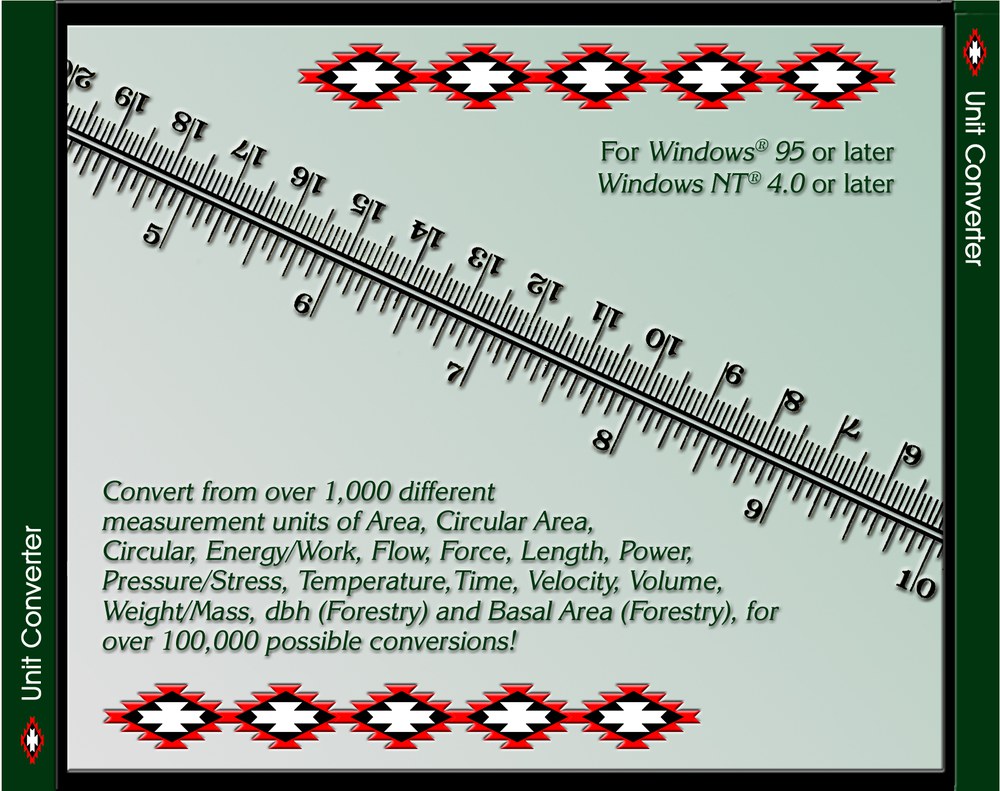
For historical interest: the original Unit Converter was sold on CD, for Windows 95 and Windows NT 4.0, with this disc and case. Both photographs are of Mexican spotted owls that Jeff Jenness was working with near Flagstaff, Arizona, in the 1990s. Click a picture to see it full size.
Recommended citation
Credits and references
By Jeff Jenness, Jenness Enterprises (www.jennessent.com). A modernized version of his Unit Converter program of 2000 and 2001, whose catalog of units and definitions it carries. The photograph of Hell's Half Acre is by WYDOTman at English Wikipedia, under the Creative Commons Attribution-ShareAlike 3.0 license, via Wikimedia Commons.
The basemap under the maps in the figures on this page is Esri's National Geographic World Map basemap (sources: National Geographic, Esri, Garmin, HERE, UNEP-WCMC, USGS, NASA, ESA, METI, NRCAN, GEBCO, NOAA, increment P Corp.).
- Esri. 2026. National Geographic World Map [basemap]. ArcGIS Online, Esri, Redlands, California. arcgis.com/home/item.html?id=b9b1b422198944fbbd5250b3241691b6. Accessed on 18 October 2026.
Licensing information
Works at every ArcGIS Pro license level (Basic, Standard, Advanced). No extension licenses are required.
Related tools and pages
- Convert Field Units — the geoprocessing tool behind the Convert a Field tab.
- Patch Analysis — the tool whose route segments the field example converts.
- Corridor Evaluation Tutorial — where those segments come from.
- Attribute Summary Reports — another window for working with the values in a table.