
Topographic Position Index (TPI)
Notice: For ArcGIS users, portions of this tool have been rewritten and are available in the ArcGIS Land Facet Corridor Designer extension.
NAME:
Topographic Position Index (TPI) v. 1.3a (Click name to download)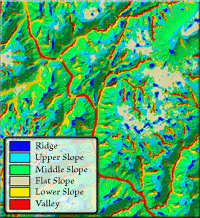
View and Download TPI Poster
View Original TPI Poster by Andrew Weiss
Aka: tpi_jen.avx
Last modified: September 15, 2006
TOPICS: Topography Position Index TPI Landform Slope Classification Standardization Neighborhood Statistics
AUTHOR:
Jeff Jenness, GIS AnalystJenness Enterprises
3020 N. Schevene Blvd.
Phone: 1-928-607-4638
Flagstaff, AZ 86004 USA
Email: jeffj@jennessent.com
Web Site: http://www.jennessent.com
DESCRIPTION: This extension
calculates Topographic Position Index (TPI) grids from elevation grids, and
provides a simple and repeatable method to classify the landscape into slope
position and landform category using the TPI values.
This extension provides additional functions to standardize and classify
grids, and to generate grid and neighborhood statistics.
Acknowledgments: The
author gratefully acknowledges the work of Andrew Weiss who originally
developed the TPI methodology and concepts. This extension automates Weiss’
methods and allows users to save and share classification criteria sets.
The author also acknowledges and thanks Joyce Miller of the National Oceanic
and Atmospheric Administration for suggesting this tool and for funding an
early version of it.
REQUIRES: Spatial Analyst
This extension also requires that the file "avdlog.dll" be present in the ArcView/BIN32 directory (or $AVBIN/avdlog.dll) and that the Dialog Designer extension be located in your ArcView/ext32 directory, which they usually are if you're running AV 3.1 or better. The Dialog Designer doesn't have to be loaded; it just has to be available. If you are running AV 3.0a, you can download the appropriate files for free from ESRI at:
http://support.esri.com/index.cfm?fa=downloads.patchesServicePacks.viewPatch&PID=25&MetaID=483
REVISIONS:
| Version 1.01 (July 12, 2005) corrects a bug producing an error message stating that “The script ‘grid-tools_jen.RescaleRainbowIncrements” could not be found. | |||||||||||||
| Version 1.01a (July 17, 2005) makes minor changes to the extension and edits to the manual. | |||||||||||||
| Version 1.2 (March 22, 2006) fixes an intermittent bug related to creating, saving and reusing custom landform classification sets, and which displayed an error stating that “Variable theTPI1Units2GridString has not been initialized.” | |||||||||||||
Version 1.3 (April 24, 2006) fixes 3 bugs:
| |||||||||||||
| Version 1.3a (September 15, 2006) fixes a bug in which Slope Position and Landform class grids were not sorted correctly, so that classes that referenced the same region on the landscape might not receive precedence according to class number. |
Recommended Citation Format: For those who wish to cite this extension, the author recommends something similar to:
Jenness, J. 2006. Topographic Position Index (tpi_jen.avx) extension for ArcView 3.x, v. 1.3a. Jenness Enterprises. Available at: http://www.jennessent.com/arcview/tpi.htm.
Please let me know if you cite this extension in a publication (jeffj@jennessent.com). I will update the citation list to include any publications that I am told about.
General Instructions:
- Begin by placing the tpi_jen.avx file into the ArcView
extensions directory (../../Av_gis30/Arcview/ext32/).
- After starting ArcView, load the extension by clicking on File -->
Extensions… , scrolling down through the list of available extensions,
and then clicking on the checkbox next to the extension called
Topographic Position Index
- This extension will new menu to your View:
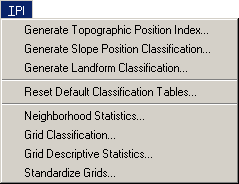
- For detailed instructions, view on-line PDF version of TPI Documentation
Enjoy! Please contact the author if you have problems or find bugs.
Jeff Jenness jeffj@jennessent.com
Jenness Enterprises http://www.jennessent.com
3020 N. Schevene Blvd. (928) 607-4638
Flagstaff, AZ 86004
USA
Please visit Jenness Enterprises ArcView Extensions site for more ArcView Extensions and other software by the author. We also offer customized ArcView-based GIS consultation services to help you meet your specific data analysis and application development needs.